


GA4 Event Tracking Guide: Master Analytics in 2026
Unlock the full potential of your website and app data. In 2026, mastering ga4 event tracking is the difference between guessing and knowing what truly drives your business forward.
This guide strips away the confusion around ga4 event tracking. You’ll discover how to capture, analyse, and act on user behaviour with confidence. Whether you want to improve conversions or understand your audience, this is your roadmap.
We’ll break down the event-based model, explore key event types, walk through setup, and share advanced strategies. Expect troubleshooting tips and insights into what’s next for analytics.
Ready to turn data into decisions? Dive in and elevate your analytics game for 2026.
Understanding GA4 Event Tracking: The Foundation
Unlocking the real value of your website and app data starts with understanding how ga4 event tracking works at its core. This section lays out the key differences, core concepts, and smart practices to build a bulletproof analytics foundation.
The Shift from Universal Analytics to GA4
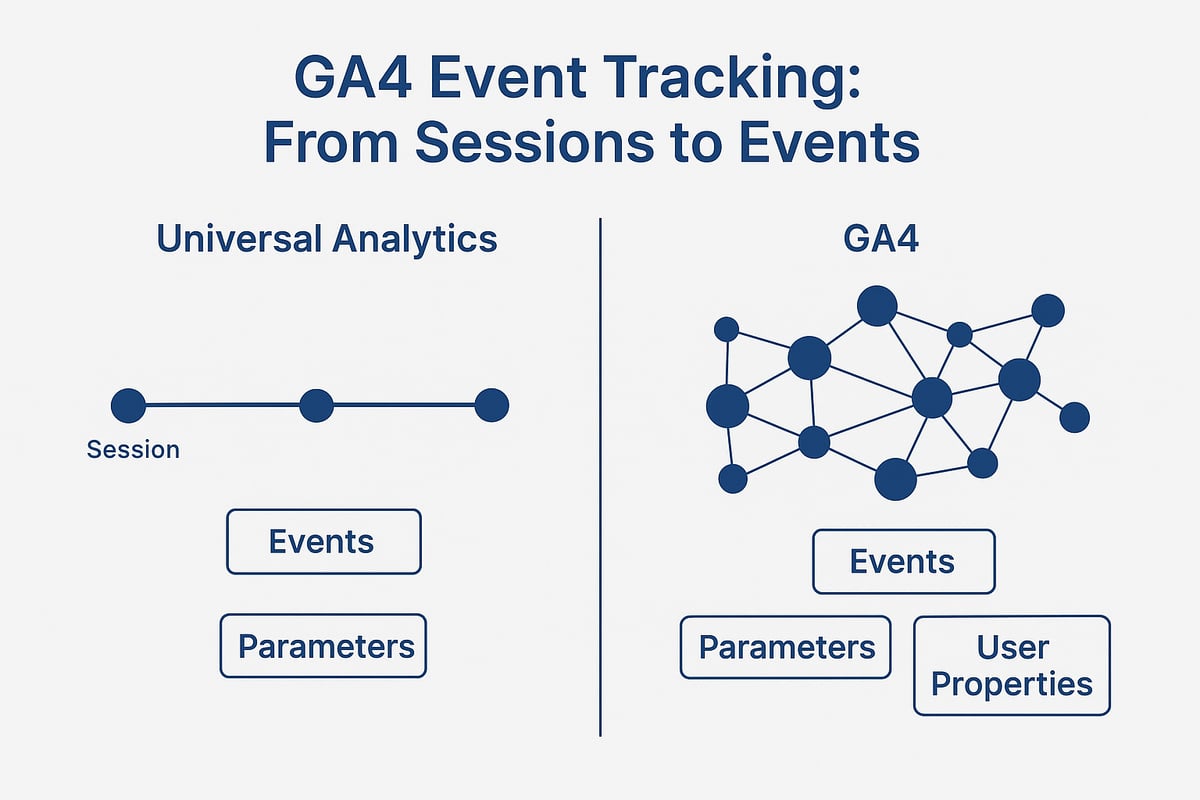
For years, Universal Analytics relied on a session-based model, collecting data in batches tied to user visits. This approach, while familiar, often left gaps, especially as users hopped between devices or engaged in ways that didn’t fit neat sessions.
GA4 flips the script by adopting an event-based model. Every interaction, from a button click to a video play, is tracked as a discrete event. This means ga4 event tracking allows you to see exactly what users do, no matter the device or platform.
Why did Google make this switch? Flexibility is a big reason. With events, you can track cross-platform journeys, capture richer details, and adapt quickly as your site or app evolves. After Universal Analytics was retired in 2023, adoption of GA4 soared, as businesses recognised these benefits.
Let’s say you want to track a form submission, a video play, or a purchase. With ga4 event tracking, each action is logged as a separate event, making your analytics more precise and actionable.
If you want to dive deeper into the nuts and bolts, check out these event tracking best practices for a practical guide on setting up and refining your GA4 events.
Ultimately, event-based tracking is essential for today’s multi-device customers and the fast pace of digital business.
Core Concepts: Events, Parameters, and User Properties
So, what exactly is an “event” in the context of ga4 event tracking? In GA4, an event is any user interaction you care about. This could be a page_view, a click, a purchase, or even something custom like newsletter_signup.
But events alone don’t tell the whole story. Each event can include parameters—extra bits of data that provide context. For instance, a purchase event might include parameters like product name, price, and quantity. Here’s a quick example:
{
  "event": "purchase",
  "parameters": {
    "product_name": "Wireless Headphones",
    "price": 99.99,
    "quantity": 2
  }
}
User properties are different. These are persistent attributes linked to a user, like subscription_level or user_type. They help you segment audiences and build more personalised experiences.
With ga4 event tracking, using parameters and user properties lets you slice and dice your audience. Want to target users who bought a specific product or have a certain subscription? You can easily build those segments for sharper campaigns and reporting.
Event Taxonomy: Types and Best Practices
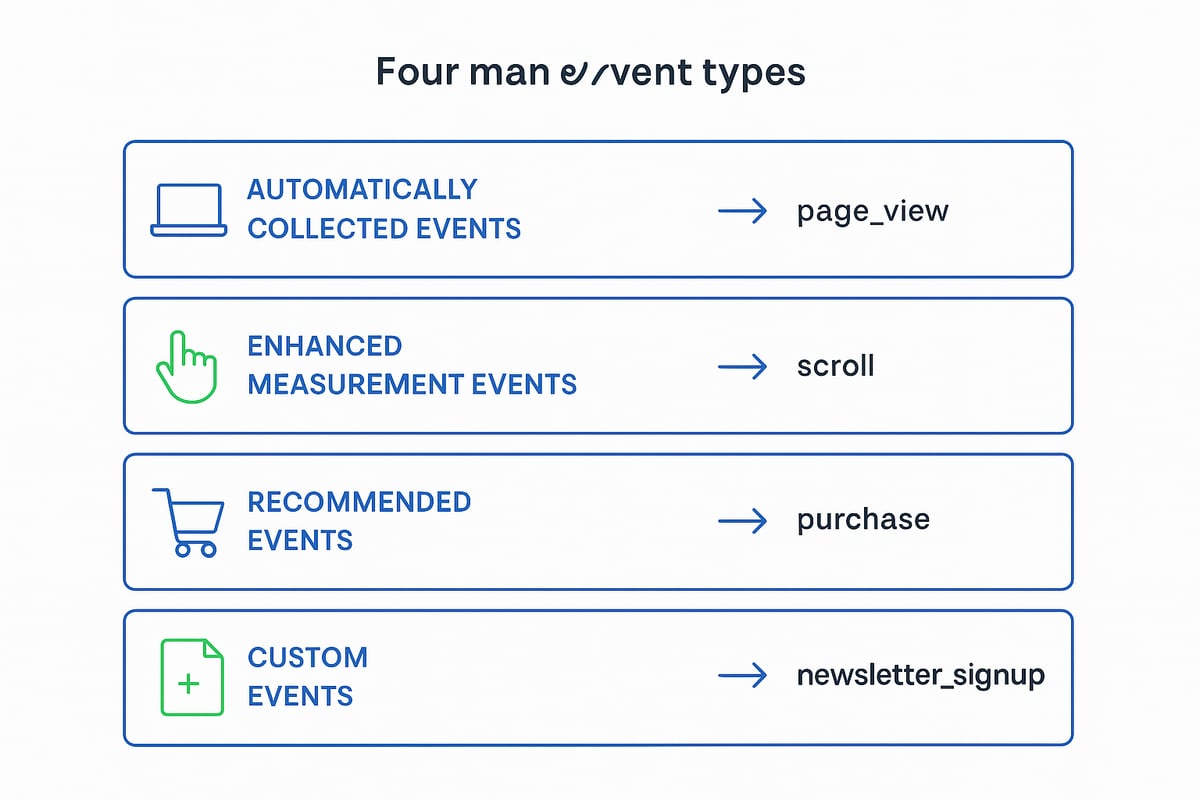
GA4 comes with several event categories to make your analytics life easier:
| Event Type | Examples | How It’s Collected |
|---|---|---|
| Automatically Collected | session_start, page_view | By default |
| Enhanced Measurement | scroll, file_download | Enabled in GA4 settings |
| Recommended | sign_up, purchase | Google suggests you track |
| Custom | newsletter_signup | You define and implement |
Automatically collected events cover basics like session starts and page views. Enhanced measurement events, such as scrolls and file downloads, require just a toggle in GA4.
Recommended events are designed for specific industries, like sign_up for SaaS or purchase for e-commerce. Custom events come into play when you want to track something unique, such as a quiz_completed action with a score parameter.
For clean reporting, it’s vital to use consistent naming conventions and keep thorough documentation. For example, always use lowercase, avoid spaces, and be specific in your event names.
Document every custom event, note what parameters you’re sending, and review your event setup regularly. This keeps your ga4 event tracking streamlined, accurate, and ready to scale as your business grows.
Key Event Types in GA4 and Their Business Value
Getting the right data from your website or app starts with understanding the main event types in GA4 event tracking. Each type serves a unique purpose and, when used together, gives you a powerful toolkit to measure what really matters for your business. Let’s break down the core event types and see how they drive value.
Automatically Collected and Enhanced Measurement Events
GA4 event tracking makes life easier by automatically recording a set of foundational events as soon as you install it. These include page_view, session_start, and first_visit. You don’t have to lift a finger to get this baseline data.
Enhanced measurement takes it a step further. With a simple toggle, you can capture extra actions like scroll, outbound_click, form_submit, and video engagement. For instance, scroll tracking shows you how far users get down a page, helping you spot where interest drops off.
Here’s a quick overview:
| Event Type | Examples | Business Value |
|---|---|---|
| Automatically Collected | page_view, first_visit | Baseline user activity |
| Enhanced Measurement | scroll, file_download | Content and engagement trends |
With these events, GA4 event tracking delivers essential analytics with minimal setup. You can identify which pages attract attention, how users interact, and where you might need to improve content layout. This automatic data is the backbone of every analytics strategy.
Recommended and E-commerce Events
For deeper insights, GA4 event tracking offers recommended events tailored for common business goals. These include key actions like login, sign_up, share, and purchase. E-commerce businesses get extra options, such as view_item, add_to_cart, begin_checkout, purchase, and refund.
Let’s take an online shop as an example. Tracking a customer’s journey from viewing a product to completing a purchase helps you pinpoint where people drop off. This gives you the chance to fix bottlenecks and boost sales.
Industry benchmarks show that businesses using e-commerce events in GA4 see up to 20 percent more accurate conversion data. By tracking each stage of the funnel, you get richer reports and can even tap into predictive analytics.
Here’s how a typical e-commerce funnel looks using GA4 event tracking:
- Product viewed (
view_item) - Added to basket (
add_to_cart) - Checkout started (
begin_checkout) - Purchase completed (
purchase)
Not only does this approach improve measurement accuracy, but it also supports better KPI tracking and analytics, making it easier to see what’s driving your bottom line.
Custom Events for Advanced Insights
Sometimes, the standard options just don’t cut it. That’s where custom events come in. With GA4 event tracking, you can create events for unique business actions or micro-conversions that matter to you.
Say you run a quiz on your site. You might create a custom event called quiz_completed with a parameter for the user’s score. Or you could track a newsletter_signup event and capture the source, helping you see which marketing channels work best.
To get the most out of custom events:
- Avoid duplicating existing event names.
- Use clear, consistent naming conventions.
- Document every custom event for future reference.
Custom events unlock insights tailored to your business model. They let you measure what truly moves the needle, so you’re never stuck with generic data that misses your unique goals.
Step-by-Step: Setting Up Event Tracking in GA4
Setting up ga4 event tracking might seem daunting, but breaking it down into clear steps makes the process manageable for any marketer, analyst, or developer. Here’s how to get it right, so your data drives real business growth.
Step 1: Planning Your Event Strategy
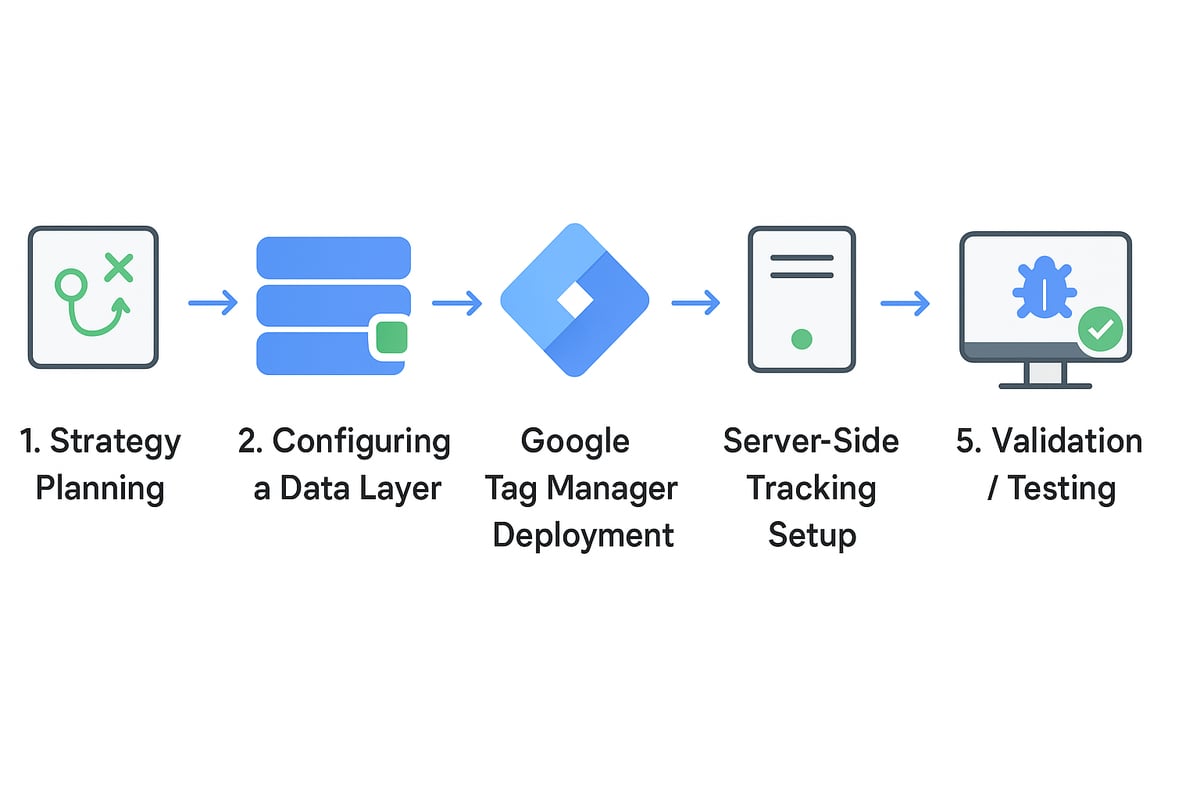
Before diving into tools, start with a strategy for ga4 event tracking. Ask yourself: What actions matter most on your site or app? Identify your business goals, such as generating leads, driving sales, or increasing engagement.
List the key user interactions that align with these goals. For e-commerce, focus on events like product views, add to cart, and purchases. For service sites, prioritise contact form submissions or newsletter signups.
Map out which events are standard (automatically collected), recommended (like sign_up or purchase), and which need to be custom. Consider both micro-conversions and major milestones.
Use a table to organise your plan:
| Event Name | Type | Description | KPI Alignment |
|---|---|---|---|
| page_view | Standard | Every page load | Engagement |
| add_to_cart | Recommended | Add product to basket | Conversion |
| newsletter_signup | Custom | Email sign-up | Lead Generation |
A clear plan ensures ga4 event tracking delivers insights that translate into real action.
Step 2: Configuring the Data Layer and Tagging Infrastructure
A well-structured data layer is the backbone of effective ga4 event tracking. The data layer acts as a bridge between your website and analytics, capturing details about user actions and passing them to GA4.
For e-commerce, set up the data layer to include product details, transaction values, and user IDs. Here’s a simple example in JavaScript:
window.dataLayer = window.dataLayer || [];
window.dataLayer.push({
  'event': 'purchase',
  'transaction_id': '12345',
  'value': 99.99,
  'currency': 'GBP',
  'items': [{
    'item_id': 'sku_001',
    'item_name': 'T-shirt',
    'quantity': 2
  }]
});
Work with developers to ensure the data layer is consistent across all pages and actions. This structure allows ga4 event tracking to remain robust as your site evolves.
A clean data layer also makes it easier to add, change, or troubleshoot events without rewriting code every time you want new insights.
Step 3: Using Google Tag Manager (GTM) for Event Deployment
Google Tag Manager (GTM) makes deploying ga4 event tracking flexible and efficient. Instead of hard-coding tags, you use GTM’s web interface to create, test, and publish event tags.
Start by creating a new GA4 event tag in GTM. Set the event name (like “add_to_cart”) and map variables from your data layer to the tag’s parameters. For example, link {{DL - item_id}} to the GA4 parameter item_id.
Set up triggers for each tag based on user actions, such as clicks, form submissions, or page views. Use GTM’s built-in variables, or define custom ones as needed.
Here’s a quick checklist:
- Create a new GA4 event tag
- Configure event parameters
- Set relevant triggers (e.g. Clicks, Form Submits)
- Test in GTM’s Preview mode
If you want a step-by-step visual walkthrough, check out this GA4 event tracking tutorial.
GTM empowers non-developers to manage ga4 event tracking, reducing dependency on IT and speeding up your analytics workflow.
Step 4: Server-Side Tracking for Accuracy and Compliance
Traditional client-side ga4 event tracking can be blocked by browser restrictions or privacy tools. Server-side tracking solves this by sending data directly from your server to Google Analytics, bypassing many blockers.
Benefits include improved data reliability, better compliance with privacy regulations (like GDPR), and the ability to capture events even when cookies are disabled.
To get started, deploy a server-side GTM container. Set up endpoints to receive event data from your site or app, then forward it to GA4. This approach is especially valuable for sensitive events like purchases or logins.
Server-side ga4 event tracking increases accuracy and future-proofs your analytics in a privacy-first world.
Step 5: Validating and Testing Your Event Setup
Never assume your ga4 event tracking is working perfectly out of the box. Use GA4’s DebugView and Tag Assistant browser extension to watch events in real time as you test your site.
Check that each event fires at the right moment, with all parameters correctly populated. Review GA4’s real-time and standard event reports to confirm data accuracy.
Troubleshoot common issues:
- Missing parameters: Check your data layer and tag mapping.
- Duplicate events: Ensure triggers are not firing multiple times.
- Misfires: Validate trigger conditions in GTM.
Document any changes and test after every site update. Reliable ga4 event tracking is only possible with continuous validation and attention to detail.
Analysing and Acting on Event Data in GA4
Unlocking value from ga4 event tracking is about more than just collecting data. It’s about turning those insights into smart, profitable action. Let’s break down the practical steps so you can move from raw numbers to real business growth.
Accessing and Interpreting Event Reports
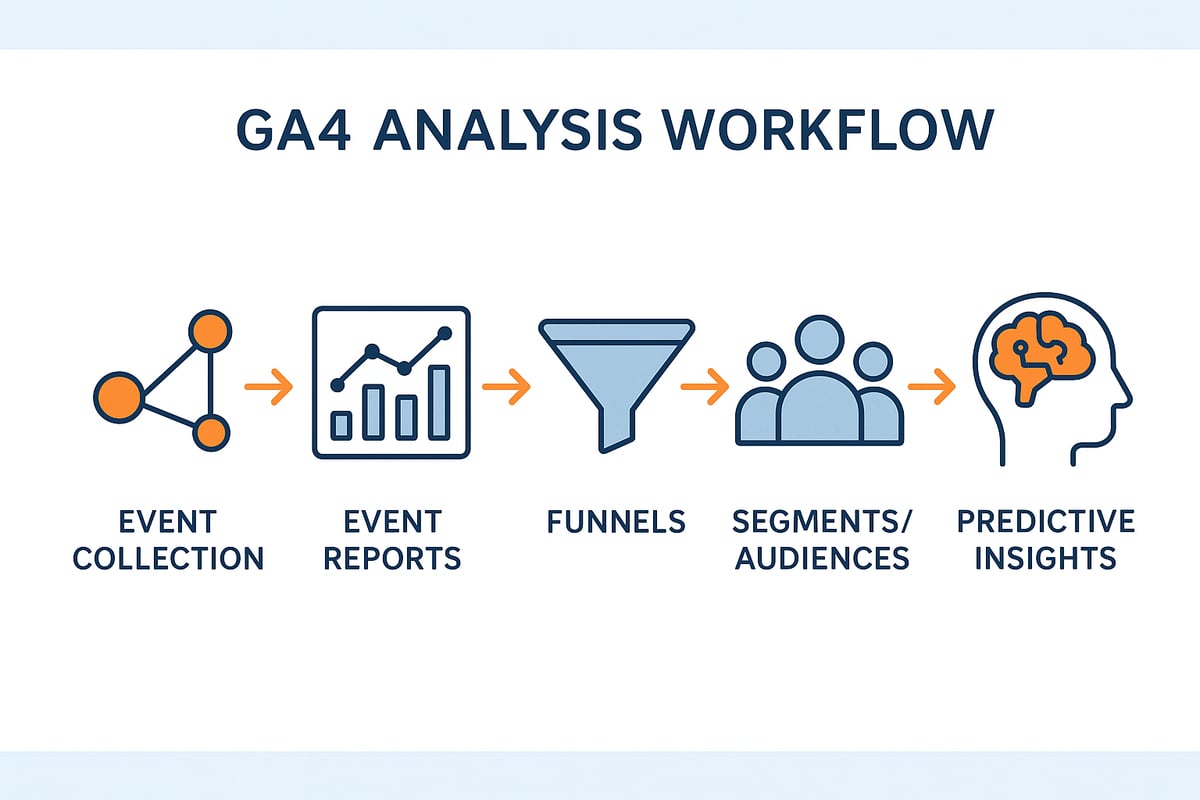
The Events report is your gateway to understanding user behaviour through ga4 event tracking. You’ll find it in the GA4 dashboard under “Reports” then “Engagement.” Here, each event—like page_view, click, or purchase—is tracked with counts and engagement metrics.
Key metrics you’ll see include:
| Metric | What it Tells You |
|---|---|
| Event count | How often the event occurred |
| Event value | Total value assigned to the event |
| Users | Number of unique users triggering it |
| Engagement time | Average time users interact |
By analysing these figures, you can spot which actions drive the most engagement and revenue. For example, if “add_to_cart” events spike after a campaign, you know what’s working.
Understanding the context of each event is vital. Use parameters (like product name or page location) to filter and compare results. This level of detail in ga4 event tracking helps you pinpoint what’s moving the needle.
Building Funnels and User Journeys
Funnels bring clarity to the chaos of user paths. With ga4 event tracking, you can set up custom funnels to visualise exactly how visitors move from discovery to conversion.
A typical funnel might look like this:
product_view -> add_to_cart -> begin_checkout -> purchase
GA4’s funnel analysis tools highlight where users drop off, so you can address friction points. For example, if many drop between “add_to_cart” and “checkout,” maybe your shipping costs need review.
By leveraging Marketing attribution insights, you can connect these funnel stages to specific marketing activities. This way, you see which campaigns are driving the most valuable actions, making ga4 event tracking a direct path to better ROI.
Optimising these journeys isn’t just about fixing leaks. It’s about designing smoother, more profitable experiences at every step.
Leveraging Segments and Audiences
Segmentation is where ga4 event tracking really shines. In GA4, you can create segments based on any combination of events and parameters. Want to see only users who watched a video and then filled out a form? Easy.
Benefits of smart segmentation include:
- Targeted remarketing (e.g., users who abandoned baskets)
- Personalised experiences (e.g., show offers to high-value segments)
- Focused reporting (e.g., analyse only engaged users)
With audiences, you can push these segments directly into ad platforms or email campaigns. This makes your marketing smarter and more cost-effective.
The beauty of ga4 event tracking is that these segments update in real time. You always know who’s most likely to convert or engage.
Using Predictive and Custom Insights
GA4 takes things further with predictive metrics and custom explorations. Thanks to machine learning, you can estimate purchase probability, predict churn, or spot trends before they become obvious.
For example, you might discover that users who complete three or more key events in a session are twice as likely to buy. Create a custom exploration to dig deeper into these patterns and uncover your most valuable actions.
GA4’s predictive insights help you act before opportunities slip away. Combined with solid ga4 event tracking, you’re not just analysing the past—you’re shaping the future of your business.
Every insight you gather is a chance to take action. That’s how data turns into growth.
Monitoring, Debugging, and Troubleshooting GA4 Event Tracking
Staying on top of ga4 event tracking is essential if you want reliable, actionable analytics. Even a small misconfiguration can lead to lost data or skewed reports, which means missed opportunities for your business. Let’s look at how to monitor, debug, and maintain your GA4 setup so every event counts.
Ongoing Monitoring with GA4 Tools
Regular monitoring is your safety net for ga4 event tracking. The GA4 Realtime report and DebugView are your first line of defence. They let you see events as users trigger them, so you can spot issues quickly.
- Use Realtime to verify that key events (like purchases or sign-ups) are firing as expected.
- DebugView helps you drill down into individual user sessions, revealing which events and parameters are sent.
- Set up custom alerts in GA4 to notify you if critical events, such as "checkout" or "purchase," drop unexpectedly.
Imagine you launch a new landing page and suddenly see a dip in "checkout" events. Realtime and DebugView will help you pinpoint whether the issue is with tracking, the user journey, or something else entirely.
Proactive monitoring is not just about catching problems, it’s about ensuring your ga4 event tracking keeps pace as your site evolves.
Debugging Common Event Tracking Issues
When ga4 event tracking goes wrong, you need a methodical approach to troubleshoot. The most common problems are missing events, duplicates, or incorrect parameters.
- Double-check your data layer to ensure all required variables are present.
- Use browser extensions like Tag Assistant and GA4 Debugger to test event firing in real time.
- Look for parameter mismatches, such as a missing
transaction_idon purchase events.
For example, if your "purchase" event is missing revenue data, inspect your data layer with the browser console:
console.log(window.dataLayer);
This will show you if the right values are being pushed. If you want to go deeper, explore GA4 event tracking best practices for advanced debugging tips and expert strategies.
Consistent audits and testing will ensure your data remains accurate, saving you from headaches during reporting season.
Best Practices for Maintenance and Scaling
Maintaining ga4 event tracking is not a one-off job, it’s an ongoing commitment. Documentation is your friend—track every event, parameter, and change in a shared log.
- Review your event setup regularly, especially after website updates.
- Align your tracking with changing business goals and new GA4 features.
- Plan for scalability by keeping naming conventions consistent and avoiding event sprawl.
Prepare for the future by training your team on both the fundamentals and latest GA4 enhancements. A disciplined approach will keep your analytics sharp and your business ready for whatever comes next.
Future-Proofing Your Analytics: Trends and Recommendations for 2026
Staying ahead in analytics means adapting faster than the competition. As we approach 2026, ga4 event tracking will be at the heart of every smart data strategy. The landscape is shifting rapidly, with privacy laws, AI, and integration demands all reshaping how we collect, analyse, and act on data.
Privacy, Compliance, and the Cookieless Future
Privacy is no longer just a legal box-tick, it is a core part of your analytics strategy. With regulations like GDPR, ePrivacy, and CCPA tightening, you cannot afford to ignore compliance. Users now expect transparency and control over their data, and failing to deliver could cost you both trust and conversions.
The move towards a cookieless web means ga4 event tracking must rely more on first-party data, server-side tracking, and Google’s Consent Mode. For example, implementing Consent Mode for EU visitors ensures you collect events without breaching user consent. Industry surveys reveal that 70% of users demand more transparency, so prioritising privacy-centric analytics is not just smart, it is essential for business survival.
Strategies for Cookieless Success:
- Use server-side tracking to record key events when browser cookies are blocked.
- Regularly review consent banners and data collection policies.
- Train your team on new privacy features in GA4.
AI and Automation in Event Tracking
Artificial intelligence is transforming how we approach ga4 event tracking. Machine learning now powers predictive insights, anomaly detection, and even suggests new conversion events you might be missing. This shift is not just hype, it is already driving real business value.
With AI-powered marketing analytics, you can uncover trends invisible to the naked eye, automate reporting, and optimise funnels with minimal manual input. For example, AI can flag when a funnel step is underperforming or recommend tracking a new user action that signals purchase intent.
What’s Next for AI in GA4?
- Automatic anomaly detection in event patterns
- Predictive audiences for smarter targeting
- AI-generated recommendations for event taxonomy improvements
If you want to stay competitive, start experimenting with these features now.
Integrating GA4 with Marketing and Sales Platforms
No analytics platform is an island. The real power of ga4 event tracking comes when you connect it to your wider marketing stack. By syncing GA4 events with Google Ads, Meta Ads, email automation, and CRM tools, you create a seamless flow of insight across the funnel.
Imagine this: A user clicks “add_to_cart” on your site, and that event instantly triggers an abandoned cart email via your CRM. Or, you segment audiences in GA4 and push them directly to remarketing campaigns. Integration like this enables full-funnel attribution and smarter, more profitable campaigns.
Integration Best Practices:
- Use GA4’s built-in connectors for Google Ads and BigQuery.
- Leverage webhooks or API integrations for other platforms.
- Schedule regular checks to ensure data sync is accurate.
Preparing for New Features and Industry Shifts
The world of analytics does not stand still, and neither should your approach to ga4 event tracking. Google regularly releases updates, from more granular event controls to predictive audiences and enhanced reporting features. Early adoption of these tools gives you a vital edge over your competitors.
Stay informed by following GA4 adoption statistics 2025 and industry blogs. This will help you spot trends, benchmark your setup, and plan for future updates. Continuous learning and adaptation are essential as the analytics landscape evolves.
How to Stay Ahead:
- Join GA4 beta programmes for early access to features.
- Set up alerts for new documentation and release notes.
- Hold regular analytics reviews to align tracking with business goals.
Building an Analytics-First Culture
Technology is only half the battle. To truly unlock the power of ga4 event tracking, you need a culture that values data-driven decision making. Encourage collaboration across teams, from marketing to product to IT, and make analytics everyone’s business.
Train your staff on GA4 fundamentals and advanced techniques. Set up regular analytics reviews, where teams can discuss findings and brainstorm improvements. When everyone understands the value of clean, actionable data, you turn analytics from a cost centre into a strategic asset.
Steps to Build Your Analytics Culture:
- Offer ongoing GA4 training sessions for all staff
- Encourage teams to share insights and celebrate data-driven wins
- Document event tracking setups and changes for transparency
With the right tools, mindset, and strategy, you will not just keep up in 2026, you will lead.
Ready to take your GA4 event tracking from “I think it’s working” to “I know exactly what’s driving results”? We’ve covered how event data can transform your site, boost conversions and give you the clarity you need for smarter marketing in 2026. If you want to cut through the noise and get a tailored action plan for your business, let’s have a proper chat. Book your Get free 45 min consultation and I’ll help you pinpoint the changes that’ll make your analytics actually work for you. No jargon, just honest advice and practical steps.