Company Address
The Mercian
218 Broad Street
Birmingham, B15 1FF
Date Published
1 February 2026
# Topics
Follow Us

Web design never sits still. What worked yesterday can look dated tomorrow, making it crucial to keep your finger on the pulse of layouts web trends if you want to stay ahead in 2026.

This article dives into seven inspiring layouts web approaches predicted to shape the digital world. We will break down the latest innovations, share the benefits of each, and give you practical tips to help you create websites that stand out and convert.

Ready to give your site the edge? Let’s explore what’s next.

The Importance of Web Layouts in 2026
Staying ahead in digital means understanding why layouts web matter more than ever. The way you structure content directly shapes user experience, engagement, and conversion. In 2026, layouts web are not just about looking modern, they are the blueprint for your brand’s online success.

The Importance of Web Layouts in 2026

The Evolution of Website Layouts

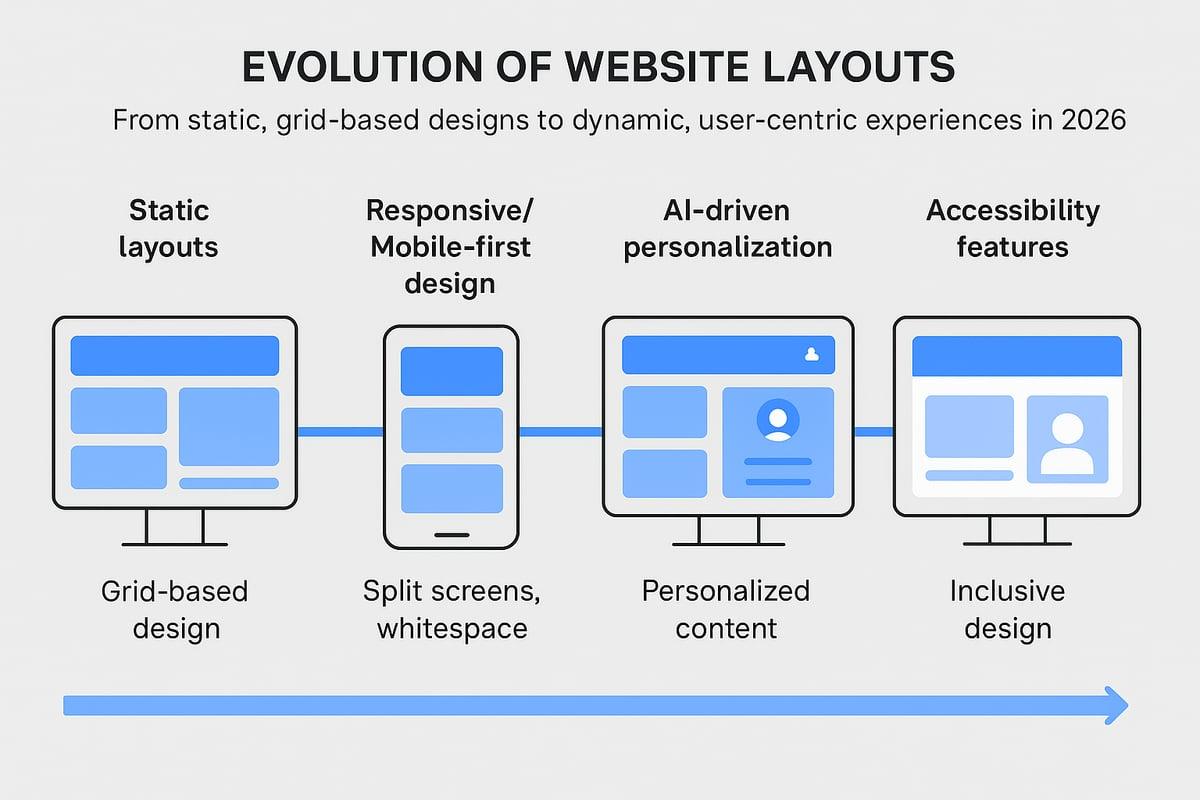
Website layouts have travelled a long road from rigid, boxy grids to dynamic, user-first experiences. Early websites felt like digital brochures, with fixed columns and little flexibility. The rise of mobile-first design changed everything, forcing layouts web to become responsive, fluid, and adaptable across devices.

AI, automation, and personalisation now drive innovation in layouts web, making every visit feel tailored. Brands using data-driven layouts web see real results. Did you know that web design influences 94% of first impressions? That’s a wake-up call for anyone underestimating the power of their site’s structure.

Modern layouts web guide users smoothly from landing to conversion. Brands like Apple and Airbnb thrive because their layouts web anticipate user needs, keep journeys intuitive, and build trust at every step. Accessibility is now a must, not a bonus. Inclusive layouts web with readable fonts, contrast, and keyboard navigation ensure everyone can engage, setting a new standard for digital design.

Key Criteria for Effective Layouts

So, what separates a forgettable site from one that converts? Effective layouts web use visual hierarchy to lead eyes exactly where you want them. Balance and intuitive navigation keep users comfortable, while whitespace and alignment declutter the screen and boost focus.

The best layouts web adapt to any device, supporting business goals like lead generation, storytelling, or building brand trust. Designers draw on psychology—think Gestalt principles or the rule of thirds—to shape layouts web that feel familiar yet fresh. Users expect both ease and innovation, so don’t reinvent the wheel, but do add your own spin.

Here’s a quick checklist for layouts web that work:

  • Clear navigation at the top or side
  • Logical flow of content blocks
  • Strategic use of whitespace for breathing room
  • Consistent alignment and spacing
  • Adaptive elements for different screen sizes

Across industries, successful layouts web share these traits. News sites use modular grids for clarity, retailers highlight products with bold visuals, and portfolios prioritise storytelling. Get these basics right and your layouts web will drive results.

How to Choose the Right Layout Trend for Your Website

Choosing the right layouts web for your site isn’t just about what looks trendy. It’s about what will help you meet your business goals, connect with your audience, and drive conversions. Let’s break down how you can make the smartest choice for your brand.

How to Choose the Right Layout Trend for Your Website

Aligning Layouts with Business Objectives

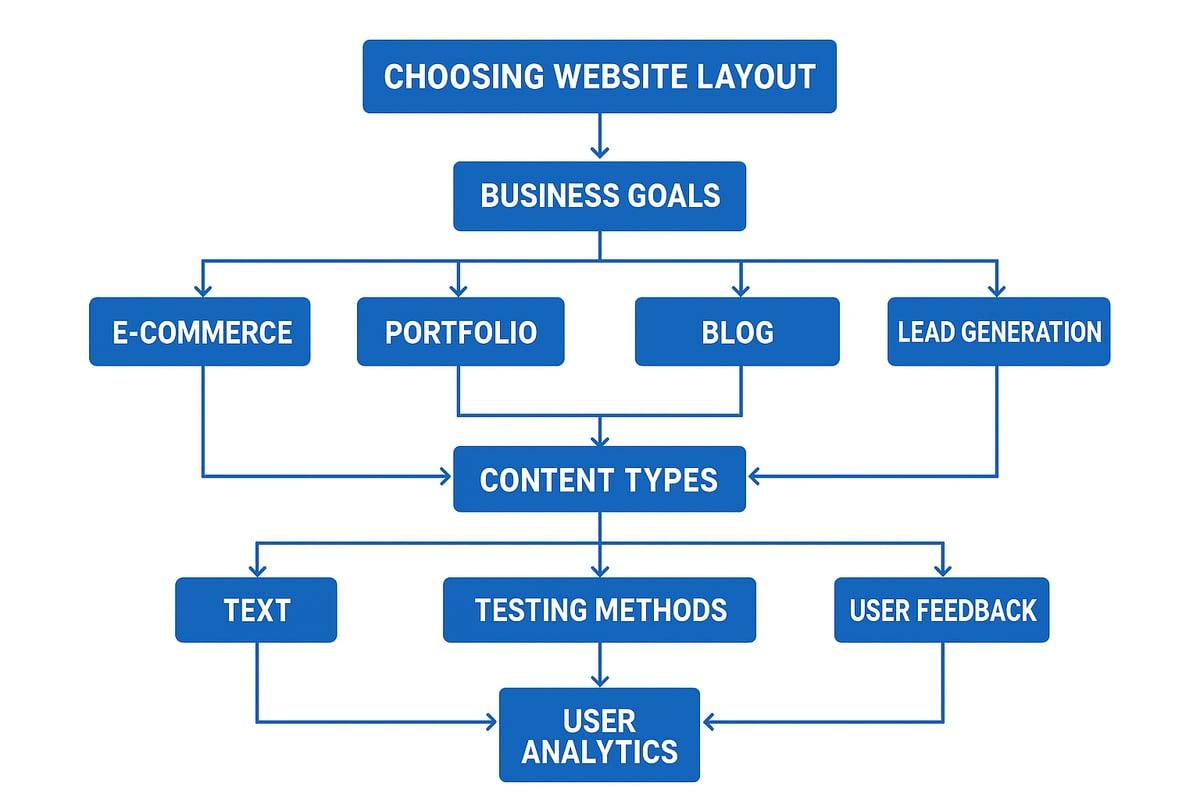
Every business has unique needs, so your layouts web should reflect your core objectives. For an e-commerce site, product grids and clear calls to action are essential. Creative portfolios often benefit from immersive, visual-first layouts web. Blogs and news platforms thrive on modular or magazine-style structures, making content easy to scan.

Mapping your content types to the right layouts web is key. If your site is text-heavy, prioritise readability and flow. Visual or interactive content demands layouts web that showcase imagery and media without overwhelming the user. As expert advice suggests, balance text and images for optimal impact. This keeps users engaged and supports your message.

Here’s a quick table to match industries and layout types:

Industry Ideal Layouts Web
E-commerce Grid, card-based
Portfolio Split-screen, fullscreen
Blog/News Modular, magazine-style
SaaS/Service Z-pattern, minimalism

Analytics and user feedback should shape your decisions. Test how users interact with your layouts web, and don’t be afraid to iterate. Avoid common pitfalls like over-customisation, neglecting mobile users, or letting content and layout drift apart. For a deeper dive into strategic planning, check out the Website Design Strategy Guide.

Testing and Iterating Layouts

Never settle for your first version. Testing is crucial for refining your layouts web and maximising results. Start by running A/B tests on key pages. Try different structures, colours, or CTAs to see what resonates. User testing, whether through direct feedback or session recordings, reveals friction points and opportunities for improvement.

Rapid prototyping tools like Figma or Adobe XD make it easy to experiment with new layouts web before full-scale rollout. Analyse performance with metrics like:

  • Bounce rate
  • Average session duration
  • Conversion rate

Track these KPIs to spot what’s working. Qualitative feedback—think user interviews or on-page surveys—can uncover issues numbers might miss. Don’t forget, continuous improvement is the name of the game. Iterative design led to major engagement boosts for brands willing to adapt their layouts web based on real data.

By combining smart strategy with rigorous testing, you’ll ensure your layouts web not only look great but convert visitors into loyal customers.

7 Inspiring Layouts Web Trends to Try in 2026
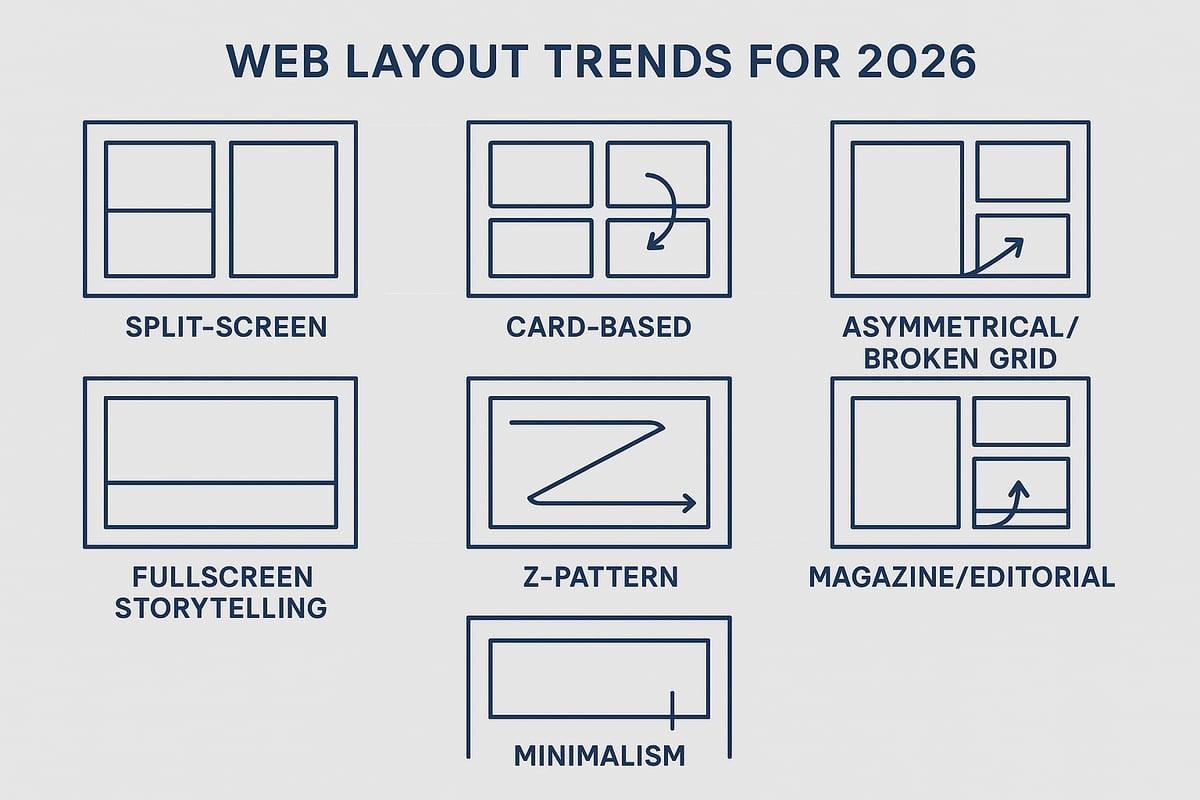
Staying ahead in web design is all about spotting the next big thing before your competitors do. In 2026, layouts web trends are set to redefine how users interact with digital experiences, making websites not just beautiful but also more effective at converting visitors. This section dives deep into seven inspiring layouts web trends poised to shape the next wave of digital innovation. Expect practical tips, real-world examples, and actionable ideas you can implement straight away.

7 Inspiring Layouts Web Trends to Try in 2026

1. Immersive Split-Screen Experiences

Split-screen layouts web are making a strong comeback, but with a twist. Instead of simply dividing the page in half, designers now use interactive zones to guide users towards distinct actions or content areas. Imagine a portfolio where one side showcases visuals and the other tells your brand story, or a SaaS landing page letting users compare two products side by side.

Why do layouts web like these work? They instantly create visual interest and offer clear navigation paths. By contrasting colours, imagery, or even motion, you draw attention to core messages or calls to action. Brands like Apple and Adidas have experimented with split-screens to great effect, boosting engagement and reducing bounce rates.

A recent study showed that layouts web with split-screen elements increased user interaction by up to 20%. The real magic comes from pairing this structure with interactive features: hover effects, smooth transitions, or synchronised scrolling. These elements make the experience feel dynamic, not static.

When implementing split-screen layouts web, always check mobile responsiveness. Stack content vertically for smaller screens and keep touch targets generous. Balance is key—avoid overwhelming users by keeping each zone focused and visually distinct.

Tips for success:

  • Use bold colour contrast to separate zones
  • Add interactive transitions for engagement
  • Prioritise accessibility with clear navigation
  • Test on multiple devices for consistency

A well-crafted split-screen layout can turn a standard website into a memorable, conversion-friendly experience.

2. Dynamic Card-Based Layouts

Card-based layouts web have risen in popularity thanks to their flexibility and clarity. Think of modular content blocks that you can shuffle, filter, or personalise for each visitor. E-commerce sites, news platforms, and dashboards all benefit from this approach, making content easy to scan and interact with.

What makes card layouts web so effective? For starters, they are naturally mobile-friendly and adapt well to different screen sizes. Pinterest and Google Now set the standard here, but modern retail and media sites have pushed the concept even further.

Key benefits of card-based layouts web:

  • Easy reordering and personalisation
  • Modular updates without full redesigns
  • Microinteractions and animations boost engagement

To stand out, enhance your cards with subtle animations, hover effects, or quick filters. Accessibility is crucial—ensure each card has sufficient contrast, logical tab order, and descriptive alt text for images.

Best practices:

  • Use consistent padding and spacing for clarity
  • Limit the number of actions per card to avoid clutter
  • Prioritise load speed by lazy-loading images

A simple table to summarise card-based layouts web:

Feature Benefit Challenge
Modular blocks Easy updates Can look generic
Mobile-friendly Reaches more users Needs careful spacing
Personalisation Higher engagement Data/privacy

For more inspiration and practical insights, check out Web Design Insights and Trends.

3. Asymmetrical & Broken Grid Layouts

Tired of rigid grids? Asymmetrical and broken grid layouts web break the mould, giving your site a fresh, creative energy. By shifting elements off-centre or overlapping sections, you create visual tension that draws users’ eyes exactly where you want them.

Creative agencies and fashion brands love this trend because it signals innovation and confidence. According to competitor insights, layouts web that use asymmetry can increase time on site as users explore unexpected patterns and flows.

Examples include layouts web where images spill into margins, text blocks float above backgrounds, or navigation shifts out of the typical top-bar position. The key is to maintain balance—use whitespace and alignment cues so the site feels intentional, not messy.

Tips for mastering asymmetrical layouts web:

  • Pair bold visuals with subtle text to avoid clutter
  • Use a strong underlying grid as an anchor
  • Test across browsers for consistency
  • Prioritise content hierarchy for usability

Challenges include browser compatibility and ensuring your design adapts gracefully to different devices. Always test broken grid layouts web on mobile, as complex arrangements can become confusing if not optimised.

A quick checklist:

  • Is the main message clear despite the irregular layout?
  • Can users navigate easily on all devices?
  • Does the design reflect your brand’s personality?

Used well, asymmetrical layouts web can set your site apart in a sea of uniformity.

4. Fullscreen Visual Storytelling

Fullscreen layouts web put your visuals front and centre, creating an immersive experience from the moment someone lands on your site. Whether it’s a hero image, looping video, or interactive animation, these layouts web grab attention and set the emotional tone for your brand.

This trend is especially powerful for product launches, creative agencies, and luxury brands looking to make an unforgettable first impression. Competitor research highlights the effectiveness of fullscreen image layouts web in boosting engagement and encouraging users to scroll or interact further.

Best practices for fullscreen layouts web:

  • Layer text and calls to action over images for clarity
  • Use subtle navigation cues to guide users
  • Optimise media for fast loading, especially on mobile
  • Test contrast and font size for accessibility

A few standout examples:

  • Creative studios using fullscreen video backgrounds to showcase work
  • Luxury brands with bold, edge-to-edge imagery and minimal text
  • Startups launching new products with animated explainers

To avoid slow load times, use image optimisation and lazy loading. Consider adaptive versions for different devices, ensuring your layouts web remain stunning and fast everywhere.

Remember, fullscreen layouts web are all about impact—so make every pixel count.

5. Adaptive Z-Pattern & F-Pattern Layouts

Ever wondered why some layouts web guide your eyes effortlessly from headline to call to action? The secret often lies in Z-pattern and F-pattern structures. These layouts web match natural eye-scanning behaviours, helping users absorb content in the order you intend.

Z-pattern layouts web work well for landing pages and simple sites, leading visitors from logo to navigation, across featured content, and finally to your CTA. F-pattern layouts web are ideal for blogs and news sites where users scan down the left margin before moving horizontally across key content.

Eye-tracking studies show that layouts web designed this way can increase engagement and conversion rates significantly. Placing your most important elements—logo, navigation, headline, CTA—along these scanning paths makes them impossible to miss.

Tips for adaptive Z- and F-pattern layouts web:

  • Prioritise key actions along the scan path
  • Use whitespace to break up sections and guide movement
  • Adapt for mobile by stacking elements logically

A simple code snippet for a Z-pattern layout using CSS Grid:

.grid-container {
  display: grid;
  grid-template-areas:
    "logo nav"
    "main cta";
}

Brands like BBC and Medium leverage these patterns to maximise readability and conversion. Get the structure right, and your layouts web will do half the selling for you.

6. Modular Magazine & Editorial Layouts

Magazine-style layouts web bring editorial flair to digital experiences. Using flexible grids, dramatic headlines, and visually rich sections, these layouts web are perfect for content-heavy sites like blogs, news outlets, and online magazines.

Why choose this trend? Modular magazine layouts web offer a balance of structure and creativity, making it easy to feature stories, images, and interactive media. Digital publications like The Guardian and Wired use these layouts web to maintain readability while keeping users engaged with dynamic content.

Benefits of modular magazine layouts web:

  • Flexible sections for varied content types
  • Enhanced visual storytelling
  • Easy integration of interactive features

Tips for standout editorial layouts web:

  • Balance text and imagery for a clean look
  • Use dynamic tables of contents or sliders for navigation
  • Optimise for tablets and mobile with adaptive grids

A quick list of interactive elements to try:

  • Embedded video or audio
  • Dynamic sidebars with trending topics
  • Clickable image galleries

Magazine layouts web aren’t just for publishers—any brand with rich content can benefit from this structured yet creative approach.

7. Minimalism with Purposeful Whitespace

Minimalistic layouts web champion simplicity, focusing on only the essentials. By stripping away clutter and embracing purposeful whitespace, you create a calm, focused environment that draws attention to what matters most—your message and calls to action.

Minimalist layouts web load faster, are easier to navigate, and often outperform busy designs in terms of accessibility and conversion. Think of high-end portfolios, consultancies, or tech brands that use plenty of breathing room, crisp typography, and clear visual hierarchy.

Key principles for minimalist layouts web:

  • Emphasise whitespace to separate key elements
  • Use bold, legible fonts for clarity
  • Highlight calls to action with colour or contrast

Avoid the common pitfall of over-simplicity. Minimalist layouts web should still reflect your brand’s identity and provide enough information for users to act. Test with real users to ensure your design is inviting, not cold or confusing.

Examples of minimalist layouts web that convert:

  • Service businesses with a single, focused CTA per page
  • Portfolios with large imagery and minimal text
  • Startups opting for a clean, modern aesthetic

Balanced use of space is critical—when done right, minimalist layouts web feel effortless and effective.

Accessibility, Performance, and SEO Considerations for Modern Layouts
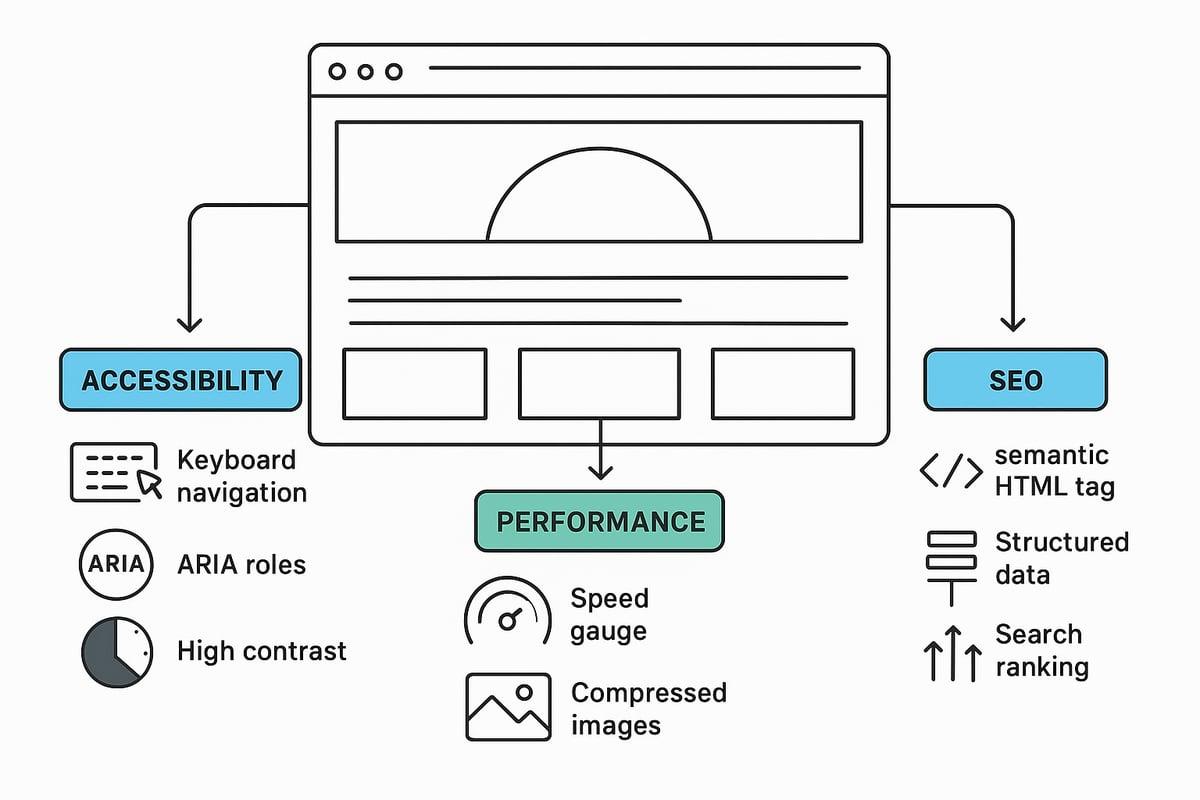
Modern layouts web must be accessible, fast, and search engine friendly to achieve real business results. Let’s break down what that means in practice, and how you can make sure your layouts web tick all the right boxes.

Accessibility, Performance, and SEO Considerations for Modern Layouts

Accessibility Best Practices

Accessibility isn’t optional anymore. If your layouts web aren’t built for everyone, you’re leaving money on the table and narrowing your reach. Following WCAG guidelines is a must. Prioritise features like:

  • Keyboard navigation for users who can’t use a mouse
  • ARIA roles to improve screen reader support
  • High contrast ratios for readability

Brands investing in accessible layouts web see measurable results, including increased conversions and broader audience engagement. For example, adding clear focus indicators and logical heading structures helps users navigate seamlessly.

Simple changes, like ensuring all interactive elements are reachable by keyboard, make a massive difference. Don’t forget about alt text for images and proper labelling for forms.

Accessibility also boosts your SEO, as search engines favour well-structured, inclusive sites. Make accessibility checks a standard part of your design process to future-proof your layouts web.

Performance Optimisation

Speed matters. If your layouts web load slowly, users bounce. Google’s Core Web Vitals now directly impact rankings. Focus on best practices like:

  • Compressing and optimising images
  • Splitting code and lazy loading non-critical assets
  • Writing efficient, minimal CSS

Consider a table to compare performance before and after these improvements:

Optimisation Load Time Before Load Time After
Image Compression 4.2s 2.1s
Code Splitting 3.5s 1.8s

Adopting these strategies can transform your layouts web from sluggish to snappy. Brands that prioritise site speed often see higher engagement and conversion rates.

For in-depth techniques and case studies, check out Website Optimisation Techniques to ensure your layouts web perform at their best.

SEO and Generative Engine Optimisation (GEO)

Your layouts web shape how search engines and AI-driven bots interpret your content. Structure is everything. Use semantic HTML elements like <header>, <nav>, <main>, and <footer> to help engines understand your site.

Optimise headings, internal links, and content blocks for clarity. Here’s a quick checklist:

  • Use descriptive H1 and H2 tags for key topics
  • Link related content internally
  • Break text into logical, digestible sections

Generative engines are getting smarter. They reward layouts web that are clean, well-organised, and user-focused. Keep your code tidy, avoid unnecessary divs, and use schema markup where relevant.

Well-optimised layouts web don’t just rank higher—they convert better, too. Regularly review your structure and update it as search technology evolves.

Future-Proofing Your Website Layout for 2026 and Beyond

Staying ahead in the world of layouts web requires more than chasing trends. It’s about creating a digital foundation that can flex, adapt, and thrive as user expectations shift and technology evolves. Let’s break down how you can ensure your site isn’t just on trend for 2026, but ready for whatever comes next.

Embracing Flexibility and Innovation

If you want your layouts web to stand the test of time, think modular. Flexible structures make it simple to swap out content or design elements as new trends emerge. This approach saves time and keeps your brand looking fresh without a full redesign every year.

AI and automation are game changers here. With smart tools, you can personalise layouts web for different audiences, automatically adjusting sections and content to match user behaviour. For a deeper dive into how AI is shaping this space, check out AI Web Design Innovations.

Take inspiration from businesses that regularly refresh their layouts web based on data and feedback. Adaptive layout styles are now a must, letting you experiment with bold ideas while maintaining a seamless experience across devices. The result? A site that evolves with your users, not against them.

Monitoring Trends and User Feedback

To future-proof layouts web, you need to keep your finger on the pulse. Regularly review design trend reports, join web design communities, and make analytics your best friend. This helps you spot shifts early and adapt before competitors catch on. For a snapshot of what’s coming, the Top 10 Website Design Trends for 2025 is a great resource.

Here are actionable steps for ongoing success:

  • Schedule annual layout reviews.
  • Invest in user testing and feedback loops.
  • Use prototyping tools for rapid experimentation.
  • Collect both quantitative (analytics) and qualitative (user interviews) data.

By weaving these habits into your digital strategy, you’ll keep your layouts web both innovative and user-friendly, ready for whatever 2026 brings.

If you’re ready to bring these 2026 layout trends to life and want your website working harder for your business, let’s chat. I know it can be tough figuring out which approach will actually drive more leads and sales—not just look good. Whether you’re on Shopify, WordPress or something else, I’ll help you cut through the noise, avoid costly mistakes, and make sure your site isn’t just following trends but turning visitors into real customers. Fancy a bit of expert advice tailored to your goals? Grab your Get free 45 min consultation and let’s make your next move count.

Web design never sits still. What worked yesterday can look dated tomorrow, making it crucial to keep your finger on the pulse of layouts web trends if you want to stay ahead in 2026.

This article dives into seven inspiring layouts web approaches predicted to shape the digital world. We will break down the latest innovations, share the benefits of each, and give you practical tips to help you create websites that stand out and convert.

Ready to give your site the edge? Let’s explore what’s next.

The Importance of Web Layouts in 2026

Staying ahead in digital means understanding why layouts web matter more than ever. The way you structure content directly shapes user experience, engagement, and conversion. In 2026, layouts web are not just about looking modern, they are the blueprint for your brand’s online success.

The Importance of Web Layouts in 2026

The Evolution of Website Layouts

Website layouts have travelled a long road from rigid, boxy grids to dynamic, user-first experiences. Early websites felt like digital brochures, with fixed columns and little flexibility. The rise of mobile-first design changed everything, forcing layouts web to become responsive, fluid, and adaptable across devices.

AI, automation, and personalisation now drive innovation in layouts web, making every visit feel tailored. Brands using data-driven layouts web see real results. Did you know that web design influences 94% of first impressions? That’s a wake-up call for anyone underestimating the power of their site’s structure.

Modern layouts web guide users smoothly from landing to conversion. Brands like Apple and Airbnb thrive because their layouts web anticipate user needs, keep journeys intuitive, and build trust at every step. Accessibility is now a must, not a bonus. Inclusive layouts web with readable fonts, contrast, and keyboard navigation ensure everyone can engage, setting a new standard for digital design.

Key Criteria for Effective Layouts

So, what separates a forgettable site from one that converts? Effective layouts web use visual hierarchy to lead eyes exactly where you want them. Balance and intuitive navigation keep users comfortable, while whitespace and alignment declutter the screen and boost focus.

The best layouts web adapt to any device, supporting business goals like lead generation, storytelling, or building brand trust. Designers draw on psychology—think Gestalt principles or the rule of thirds—to shape layouts web that feel familiar yet fresh. Users expect both ease and innovation, so don’t reinvent the wheel, but do add your own spin.

Here’s a quick checklist for layouts web that work:

  • Clear navigation at the top or side
  • Logical flow of content blocks
  • Strategic use of whitespace for breathing room
  • Consistent alignment and spacing
  • Adaptive elements for different screen sizes

Across industries, successful layouts web share these traits. News sites use modular grids for clarity, retailers highlight products with bold visuals, and portfolios prioritise storytelling. Get these basics right and your layouts web will drive results.

How to Choose the Right Layout Trend for Your Website

Choosing the right layouts web for your site isn’t just about what looks trendy. It’s about what will help you meet your business goals, connect with your audience, and drive conversions. Let’s break down how you can make the smartest choice for your brand.

How to Choose the Right Layout Trend for Your Website

Aligning Layouts with Business Objectives

Every business has unique needs, so your layouts web should reflect your core objectives. For an e-commerce site, product grids and clear calls to action are essential. Creative portfolios often benefit from immersive, visual-first layouts web. Blogs and news platforms thrive on modular or magazine-style structures, making content easy to scan.

Mapping your content types to the right layouts web is key. If your site is text-heavy, prioritise readability and flow. Visual or interactive content demands layouts web that showcase imagery and media without overwhelming the user. As expert advice suggests, balance text and images for optimal impact. This keeps users engaged and supports your message.

Here’s a quick table to match industries and layout types:

Industry Ideal Layouts Web
E-commerce Grid, card-based
Portfolio Split-screen, fullscreen
Blog/News Modular, magazine-style
SaaS/Service Z-pattern, minimalism

Analytics and user feedback should shape your decisions. Test how users interact with your layouts web, and don’t be afraid to iterate. Avoid common pitfalls like over-customisation, neglecting mobile users, or letting content and layout drift apart. For a deeper dive into strategic planning, check out the Website Design Strategy Guide.

Testing and Iterating Layouts

Never settle for your first version. Testing is crucial for refining your layouts web and maximising results. Start by running A/B tests on key pages. Try different structures, colours, or CTAs to see what resonates. User testing, whether through direct feedback or session recordings, reveals friction points and opportunities for improvement.

Rapid prototyping tools like Figma or Adobe XD make it easy to experiment with new layouts web before full-scale rollout. Analyse performance with metrics like:

  • Bounce rate
  • Average session duration
  • Conversion rate

Track these KPIs to spot what’s working. Qualitative feedback—think user interviews or on-page surveys—can uncover issues numbers might miss. Don’t forget, continuous improvement is the name of the game. Iterative design led to major engagement boosts for brands willing to adapt their layouts web based on real data.

By combining smart strategy with rigorous testing, you’ll ensure your layouts web not only look great but convert visitors into loyal customers.

7 Inspiring Layouts Web Trends to Try in 2026

Staying ahead in web design is all about spotting the next big thing before your competitors do. In 2026, layouts web trends are set to redefine how users interact with digital experiences, making websites not just beautiful but also more effective at converting visitors. This section dives deep into seven inspiring layouts web trends poised to shape the next wave of digital innovation. Expect practical tips, real-world examples, and actionable ideas you can implement straight away.

7 Inspiring Layouts Web Trends to Try in 2026

1. Immersive Split-Screen Experiences

Split-screen layouts web are making a strong comeback, but with a twist. Instead of simply dividing the page in half, designers now use interactive zones to guide users towards distinct actions or content areas. Imagine a portfolio where one side showcases visuals and the other tells your brand story, or a SaaS landing page letting users compare two products side by side.

Why do layouts web like these work? They instantly create visual interest and offer clear navigation paths. By contrasting colours, imagery, or even motion, you draw attention to core messages or calls to action. Brands like Apple and Adidas have experimented with split-screens to great effect, boosting engagement and reducing bounce rates.

A recent study showed that layouts web with split-screen elements increased user interaction by up to 20%. The real magic comes from pairing this structure with interactive features: hover effects, smooth transitions, or synchronised scrolling. These elements make the experience feel dynamic, not static.

When implementing split-screen layouts web, always check mobile responsiveness. Stack content vertically for smaller screens and keep touch targets generous. Balance is key—avoid overwhelming users by keeping each zone focused and visually distinct.

Tips for success:

  • Use bold colour contrast to separate zones
  • Add interactive transitions for engagement
  • Prioritise accessibility with clear navigation
  • Test on multiple devices for consistency

A well-crafted split-screen layout can turn a standard website into a memorable, conversion-friendly experience.

2. Dynamic Card-Based Layouts

Card-based layouts web have risen in popularity thanks to their flexibility and clarity. Think of modular content blocks that you can shuffle, filter, or personalise for each visitor. E-commerce sites, news platforms, and dashboards all benefit from this approach, making content easy to scan and interact with.

What makes card layouts web so effective? For starters, they are naturally mobile-friendly and adapt well to different screen sizes. Pinterest and Google Now set the standard here, but modern retail and media sites have pushed the concept even further.

Key benefits of card-based layouts web:

  • Easy reordering and personalisation
  • Modular updates without full redesigns
  • Microinteractions and animations boost engagement

To stand out, enhance your cards with subtle animations, hover effects, or quick filters. Accessibility is crucial—ensure each card has sufficient contrast, logical tab order, and descriptive alt text for images.

Best practices:

  • Use consistent padding and spacing for clarity
  • Limit the number of actions per card to avoid clutter
  • Prioritise load speed by lazy-loading images

A simple table to summarise card-based layouts web:

Feature Benefit Challenge
Modular blocks Easy updates Can look generic
Mobile-friendly Reaches more users Needs careful spacing
Personalisation Higher engagement Data/privacy

For more inspiration and practical insights, check out Web Design Insights and Trends.

3. Asymmetrical & Broken Grid Layouts

Tired of rigid grids? Asymmetrical and broken grid layouts web break the mould, giving your site a fresh, creative energy. By shifting elements off-centre or overlapping sections, you create visual tension that draws users’ eyes exactly where you want them.

Creative agencies and fashion brands love this trend because it signals innovation and confidence. According to competitor insights, layouts web that use asymmetry can increase time on site as users explore unexpected patterns and flows.

Examples include layouts web where images spill into margins, text blocks float above backgrounds, or navigation shifts out of the typical top-bar position. The key is to maintain balance—use whitespace and alignment cues so the site feels intentional, not messy.

Tips for mastering asymmetrical layouts web:

  • Pair bold visuals with subtle text to avoid clutter
  • Use a strong underlying grid as an anchor
  • Test across browsers for consistency
  • Prioritise content hierarchy for usability

Challenges include browser compatibility and ensuring your design adapts gracefully to different devices. Always test broken grid layouts web on mobile, as complex arrangements can become confusing if not optimised.

A quick checklist:

  • Is the main message clear despite the irregular layout?
  • Can users navigate easily on all devices?
  • Does the design reflect your brand’s personality?

Used well, asymmetrical layouts web can set your site apart in a sea of uniformity.

4. Fullscreen Visual Storytelling

Fullscreen layouts web put your visuals front and centre, creating an immersive experience from the moment someone lands on your site. Whether it’s a hero image, looping video, or interactive animation, these layouts web grab attention and set the emotional tone for your brand.

This trend is especially powerful for product launches, creative agencies, and luxury brands looking to make an unforgettable first impression. Competitor research highlights the effectiveness of fullscreen image layouts web in boosting engagement and encouraging users to scroll or interact further.

Best practices for fullscreen layouts web:

  • Layer text and calls to action over images for clarity
  • Use subtle navigation cues to guide users
  • Optimise media for fast loading, especially on mobile
  • Test contrast and font size for accessibility

A few standout examples:

  • Creative studios using fullscreen video backgrounds to showcase work
  • Luxury brands with bold, edge-to-edge imagery and minimal text
  • Startups launching new products with animated explainers

To avoid slow load times, use image optimisation and lazy loading. Consider adaptive versions for different devices, ensuring your layouts web remain stunning and fast everywhere.

Remember, fullscreen layouts web are all about impact—so make every pixel count.

5. Adaptive Z-Pattern & F-Pattern Layouts

Ever wondered why some layouts web guide your eyes effortlessly from headline to call to action? The secret often lies in Z-pattern and F-pattern structures. These layouts web match natural eye-scanning behaviours, helping users absorb content in the order you intend.

Z-pattern layouts web work well for landing pages and simple sites, leading visitors from logo to navigation, across featured content, and finally to your CTA. F-pattern layouts web are ideal for blogs and news sites where users scan down the left margin before moving horizontally across key content.

Eye-tracking studies show that layouts web designed this way can increase engagement and conversion rates significantly. Placing your most important elements—logo, navigation, headline, CTA—along these scanning paths makes them impossible to miss.

Tips for adaptive Z- and F-pattern layouts web:

  • Prioritise key actions along the scan path
  • Use whitespace to break up sections and guide movement
  • Adapt for mobile by stacking elements logically

A simple code snippet for a Z-pattern layout using CSS Grid:

.grid-container {
  display: grid;
  grid-template-areas:
    "logo nav"
    "main cta";
}

Brands like BBC and Medium leverage these patterns to maximise readability and conversion. Get the structure right, and your layouts web will do half the selling for you.

6. Modular Magazine & Editorial Layouts

Magazine-style layouts web bring editorial flair to digital experiences. Using flexible grids, dramatic headlines, and visually rich sections, these layouts web are perfect for content-heavy sites like blogs, news outlets, and online magazines.

Why choose this trend? Modular magazine layouts web offer a balance of structure and creativity, making it easy to feature stories, images, and interactive media. Digital publications like The Guardian and Wired use these layouts web to maintain readability while keeping users engaged with dynamic content.

Benefits of modular magazine layouts web:

  • Flexible sections for varied content types
  • Enhanced visual storytelling
  • Easy integration of interactive features

Tips for standout editorial layouts web:

  • Balance text and imagery for a clean look
  • Use dynamic tables of contents or sliders for navigation
  • Optimise for tablets and mobile with adaptive grids

A quick list of interactive elements to try:

  • Embedded video or audio
  • Dynamic sidebars with trending topics
  • Clickable image galleries

Magazine layouts web aren’t just for publishers—any brand with rich content can benefit from this structured yet creative approach.

7. Minimalism with Purposeful Whitespace

Minimalistic layouts web champion simplicity, focusing on only the essentials. By stripping away clutter and embracing purposeful whitespace, you create a calm, focused environment that draws attention to what matters most—your message and calls to action.

Minimalist layouts web load faster, are easier to navigate, and often outperform busy designs in terms of accessibility and conversion. Think of high-end portfolios, consultancies, or tech brands that use plenty of breathing room, crisp typography, and clear visual hierarchy.

Key principles for minimalist layouts web:

  • Emphasise whitespace to separate key elements
  • Use bold, legible fonts for clarity
  • Highlight calls to action with colour or contrast

Avoid the common pitfall of over-simplicity. Minimalist layouts web should still reflect your brand’s identity and provide enough information for users to act. Test with real users to ensure your design is inviting, not cold or confusing.

Examples of minimalist layouts web that convert:

  • Service businesses with a single, focused CTA per page
  • Portfolios with large imagery and minimal text
  • Startups opting for a clean, modern aesthetic

Balanced use of space is critical—when done right, minimalist layouts web feel effortless and effective.

Accessibility, Performance, and SEO Considerations for Modern Layouts

Modern layouts web must be accessible, fast, and search engine friendly to achieve real business results. Let’s break down what that means in practice, and how you can make sure your layouts web tick all the right boxes.

Accessibility, Performance, and SEO Considerations for Modern Layouts

Accessibility Best Practices

Accessibility isn’t optional anymore. If your layouts web aren’t built for everyone, you’re leaving money on the table and narrowing your reach. Following WCAG guidelines is a must. Prioritise features like:

  • Keyboard navigation for users who can’t use a mouse
  • ARIA roles to improve screen reader support
  • High contrast ratios for readability

Brands investing in accessible layouts web see measurable results, including increased conversions and broader audience engagement. For example, adding clear focus indicators and logical heading structures helps users navigate seamlessly.

Simple changes, like ensuring all interactive elements are reachable by keyboard, make a massive difference. Don’t forget about alt text for images and proper labelling for forms.

Accessibility also boosts your SEO, as search engines favour well-structured, inclusive sites. Make accessibility checks a standard part of your design process to future-proof your layouts web.

Performance Optimisation

Speed matters. If your layouts web load slowly, users bounce. Google’s Core Web Vitals now directly impact rankings. Focus on best practices like:

  • Compressing and optimising images
  • Splitting code and lazy loading non-critical assets
  • Writing efficient, minimal CSS

Consider a table to compare performance before and after these improvements:

Optimisation Load Time Before Load Time After
Image Compression 4.2s 2.1s
Code Splitting 3.5s 1.8s

Adopting these strategies can transform your layouts web from sluggish to snappy. Brands that prioritise site speed often see higher engagement and conversion rates.

For in-depth techniques and case studies, check out Website Optimisation Techniques to ensure your layouts web perform at their best.

SEO and Generative Engine Optimisation (GEO)

Your layouts web shape how search engines and AI-driven bots interpret your content. Structure is everything. Use semantic HTML elements like <header>, <nav>, <main>, and <footer> to help engines understand your site.

Optimise headings, internal links, and content blocks for clarity. Here’s a quick checklist:

  • Use descriptive H1 and H2 tags for key topics
  • Link related content internally
  • Break text into logical, digestible sections

Generative engines are getting smarter. They reward layouts web that are clean, well-organised, and user-focused. Keep your code tidy, avoid unnecessary divs, and use schema markup where relevant.

Well-optimised layouts web don’t just rank higher—they convert better, too. Regularly review your structure and update it as search technology evolves.

Future-Proofing Your Website Layout for 2026 and Beyond

Staying ahead in the world of layouts web requires more than chasing trends. It’s about creating a digital foundation that can flex, adapt, and thrive as user expectations shift and technology evolves. Let’s break down how you can ensure your site isn’t just on trend for 2026, but ready for whatever comes next.

Embracing Flexibility and Innovation

If you want your layouts web to stand the test of time, think modular. Flexible structures make it simple to swap out content or design elements as new trends emerge. This approach saves time and keeps your brand looking fresh without a full redesign every year.

AI and automation are game changers here. With smart tools, you can personalise layouts web for different audiences, automatically adjusting sections and content to match user behaviour. For a deeper dive into how AI is shaping this space, check out AI Web Design Innovations.

Take inspiration from businesses that regularly refresh their layouts web based on data and feedback. Adaptive layout styles are now a must, letting you experiment with bold ideas while maintaining a seamless experience across devices. The result? A site that evolves with your users, not against them.

Monitoring Trends and User Feedback

To future-proof layouts web, you need to keep your finger on the pulse. Regularly review design trend reports, join web design communities, and make analytics your best friend. This helps you spot shifts early and adapt before competitors catch on. For a snapshot of what’s coming, the Top 10 Website Design Trends for 2025 is a great resource.

Here are actionable steps for ongoing success:

  • Schedule annual layout reviews.
  • Invest in user testing and feedback loops.
  • Use prototyping tools for rapid experimentation.
  • Collect both quantitative (analytics) and qualitative (user interviews) data.

By weaving these habits into your digital strategy, you’ll keep your layouts web both innovative and user-friendly, ready for whatever 2026 brings.

If you’re ready to bring these 2026 layout trends to life and want your website working harder for your business, let’s chat. I know it can be tough figuring out which approach will actually drive more leads and sales—not just look good. Whether you’re on Shopify, WordPress or something else, I’ll help you cut through the noise, avoid costly mistakes, and make sure your site isn’t just following trends but turning visitors into real customers. Fancy a bit of expert advice tailored to your goals? Grab your Get free 45 min consultation and let’s make your next move count.

Need more help? Ask Your Question Below