
AI · 20 min read
AI Design Systems
In 2026, AI isn’t just a tool for designers, it’s the backbone of how digital products are created, scaled, and maintained. The rise of ai design systems is changing everything about how we build and manage digital experiences.
By Matt Harrison · Published · Updated · Part of the guides behind Web Design & Build
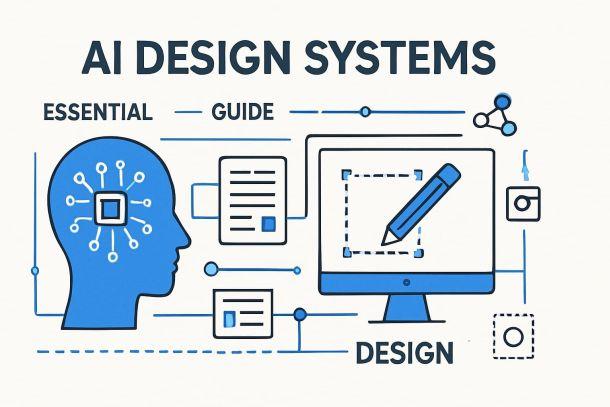
In 2026, AI isn’t just a tool for designers, it’s the backbone of how digital products are created, scaled, and maintained. The rise of ai design systems is changing everything about how we build and manage digital experiences.
This essential guide will demystify ai design systems, break down their core components, and show how they are transforming workflows. You’ll discover practical benefits, real-world examples, and the key challenges to watch out for.
Ready to future-proof your work? Dive in and learn how to leverage ai design systems for better efficiency, quality, and innovation—before your competitors do.
What Are AI Design Systems?
In 2026, ai design systems are the heartbeat of modern product development. They offer more than just a toolbox for designers and developers. These systems blend reusable components, smart automation, and AI-driven intelligence into a single, adaptive framework.
Defining AI Design Systems
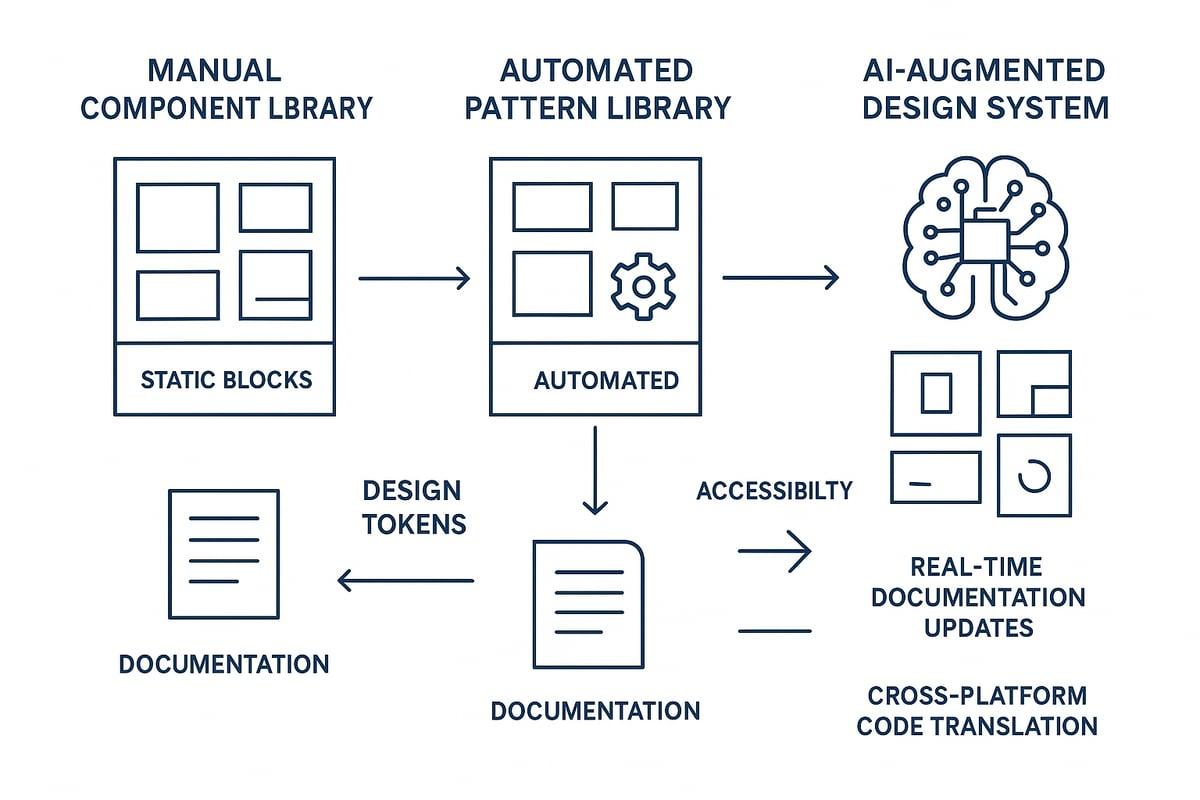
Ai design systems are collections of reusable UI components, patterns, and documentation, all powered by artificial intelligence. Unlike traditional systems, which are often static and require manual updates, ai design systems adapt and evolve in real time.
AI brings automation to the core. It analyses design files and codebases to generate, update, and even suggest new components. This means a button, form field, or navigation bar is always in sync with the latest brand and accessibility standards.
Key foundational elements include:
- Design tokens (colours, typography, spacing) for visual consistency.
- Variables and component libraries for scalable design.
- Automated documentation that stays current as components change.
Figma’s MCP server is a real-world example. It delivers AI-powered design context, enabling teams to generate code and documentation directly from design assets.
Ai design systems also act as a "lingua franca" between design, development, and AI agents. They bridge language gaps, ensuring everyone is aligned. Accessibility and inclusivity are baked in from the start, making digital products usable by all.
Want to dig deeper into the building blocks that underpin these systems? Check out these UI design best practices for a solid foundation.
Evolution from Traditional to AI-Driven Systems
The journey to ai design systems started with manual libraries. Designers and developers built and maintained collections of components by hand. This approach was slow, error-prone, and hard to scale.
Next came automated pattern libraries. These used scripts and plugins to speed up repetitive tasks, but still needed lots of human oversight.
Now, with ai design systems, large language models (LLMs) trained on design system codebases, conventions, and documentation can generate boilerplate component code. This shift has reduced manual workload by up to 90 percent, according to Brad Frost in 2024.
AI also translates code between frameworks, like React and Web Components. This makes tech stack migrations smoother and less risky. Organisations can support multiple platforms without duplicating effort.
The scalability and adaptability of ai design systems mean they fit any organisation size. Whether you’re a startup or a global enterprise, AI ensures your design system grows with you.
Ai design systems are not just a step forward, they are a leap in how we think about digital product creation.
Core Components and Capabilities of AI Design Systems in 2026
Understanding the core components and capabilities of ai design systems is essential for any business looking to modernise their digital product workflows. By 2026, these systems have evolved into intelligent, context-aware platforms that transform how teams build, maintain, and scale user interfaces.
Intelligent Component Generation and Management
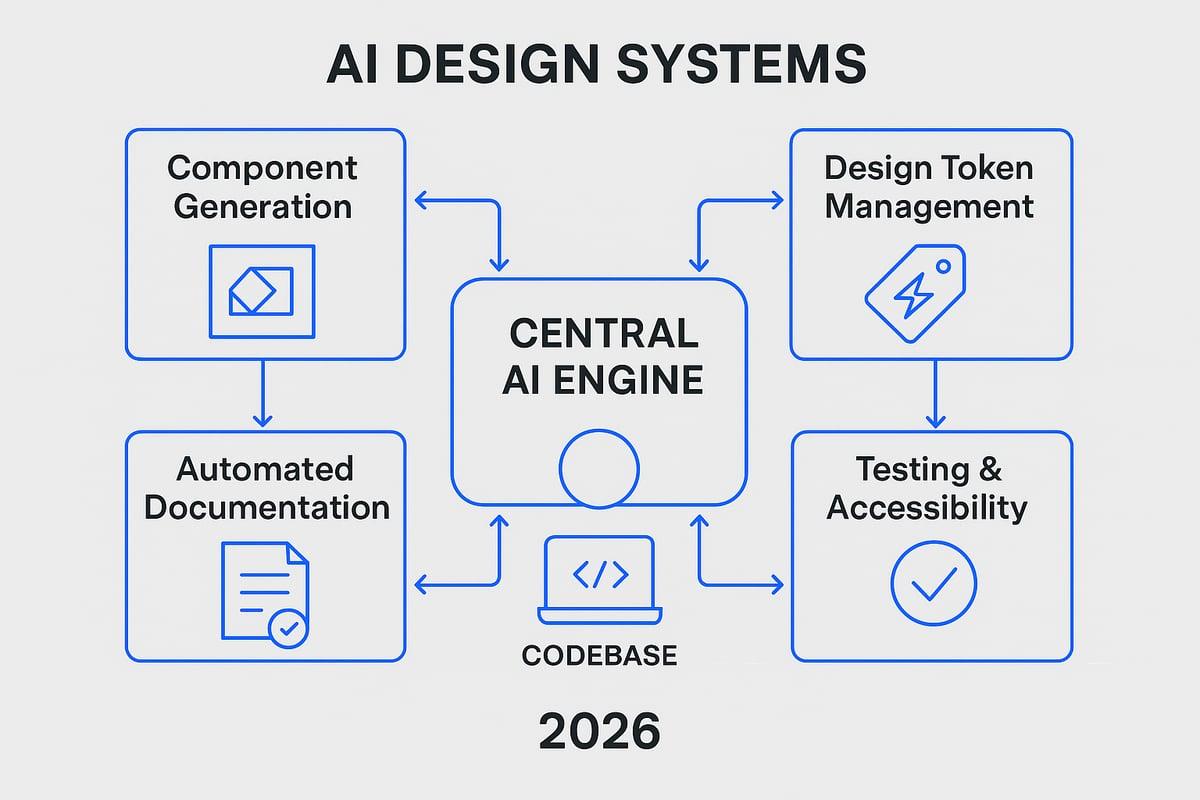
At the heart of ai design systems sits intelligent component generation. Here, AI analyses design files and codebases, identifying patterns and automatically generating or updating UI components. This means less manual coding and more time for creative thinking.
For example, platforms like Figma’s MCP server use AI to deliver context-driven component code, adapting outputs to fit organisational conventions and tech stacks. As the system learns your company’s naming patterns and design logic, it reduces duplication and keeps your libraries consistent.
The result? Faster component creation, fewer errors, and a smoother workflow for everyone involved. Ai design systems make it easier to maintain a single source of truth as your product scales.
Automated Design Token Handling
Design tokens are the DNA of visual consistency—covering colours, typography, and spacing. Ai design systems automate the identification, application, and even suggestion of new tokens across both design files and codebases.
AI-driven plugins and APIs streamline token workflows, eliminating tedious manual updates. This ensures every pixel matches your brand and accessibility standards, from the smallest button to the biggest banner.
By automating token management, ai design systems accelerate adoption and reduce mistakes. Teams can focus on evolving the look and feel, confident that every change is reflected everywhere it matters.
AI-Powered Documentation and Knowledge Sharing
Traditional documentation is often outdated almost as soon as it’s written. Ai design systems change this by using AI to extract, update, and personalise documentation directly from your live design files and code.
Large language models (LLMs) can generate tailored documentation for different stakeholders—designers, developers, or product managers. This means every team member gets the information they need, in the format that suits them best.
With always-current docs, onboarding becomes smoother and knowledge silos disappear. Ai design systems ensure that everyone stays on the same page, even as your products and teams evolve.
Automated Testing, QA, and Accessibility Auditing
Quality control is crucial, and ai design systems bring automation to testing and accessibility. AI generates and runs unit tests for components, often using pseudo-code prompts or natural language instructions. This dramatically reduces the manual QA workload and increases reliability.
AI also integrates accessibility checks, reviewing components against standards and organisational guidelines. Issues are flagged instantly, with suggestions for best practice improvements. According to AI in Software Development Statistics 2026, AI-powered tools have significantly improved code quality and test coverage, making automated QA a must-have for modern teams.
By embedding these capabilities, ai design systems help businesses deliver more robust, inclusive products with less effort.
Multiplatform and Framework Adaptation
One of the standout features of ai design systems is their ability to translate components across multiple frameworks and platforms. Whether you need to migrate from React to Vue, or support custom web components, AI handles the heavy lifting.
This adaptability reduces errors and accelerates tech stack changes, ensuring your design system remains future-proof. Ai design systems can seamlessly apply platform-specific conventions, making it easy to expand your product’s reach.
Ultimately, this multiplatform support empowers organisations of all sizes to innovate without being held back by technical constraints.
AI Integration: How AI Supercharges Design Systems
AI integration is the heartbeat of ai design systems in 2026, transforming how teams approach digital product creation. By embedding intelligent agents within design and development workflows, businesses can unlock unprecedented speed, clarity, and adaptability. Let’s break down exactly how ai design systems are changing the game.
Embedding AI in Design and Development Workflows
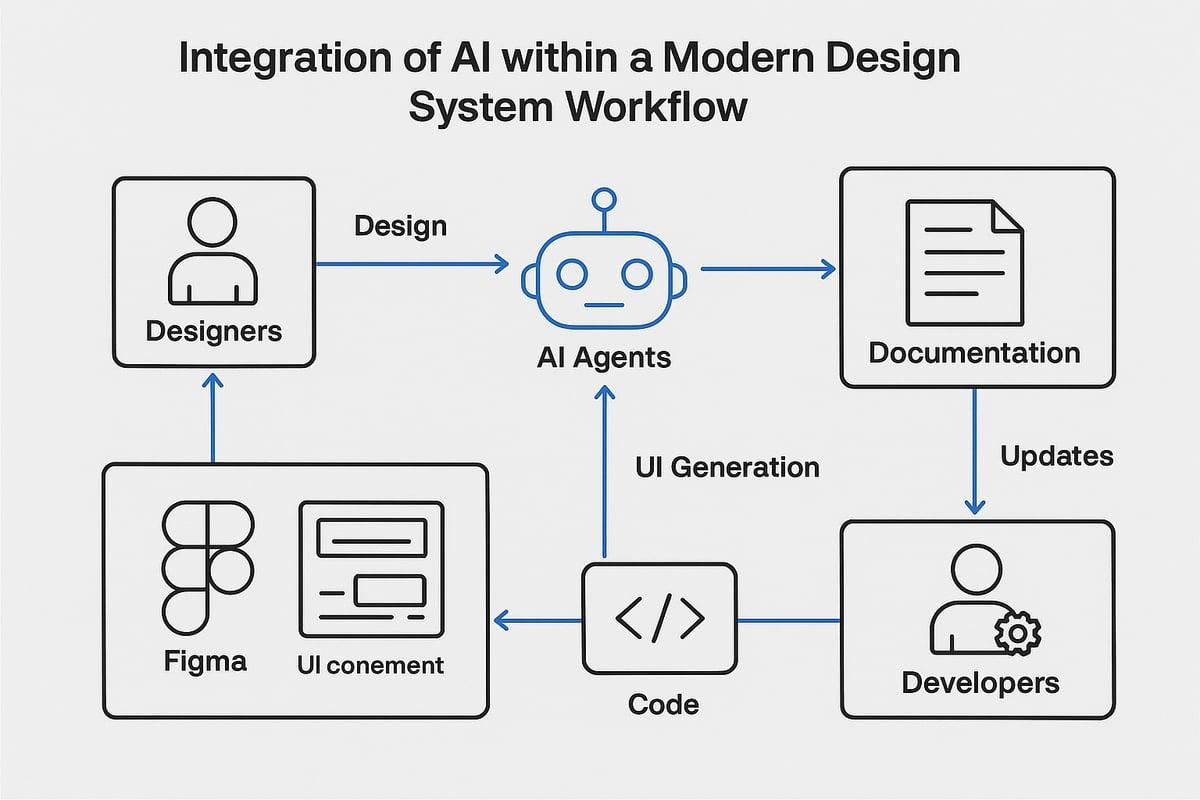
The real power of ai design systems lies in embedding AI directly into the tools designers and developers already use. In Figma, for example, the MCP server connects AI agents to design files, allowing instant context-driven component generation. Developers working in their IDEs can receive AI-suggested code snippets that match the latest design updates, bridging the gap between design intent and implementation.
This seamless integration creates a flywheel effect. As teams use ai design systems, the AI learns from each interaction, improving its suggestions and reducing friction. Feedback cycles shrink, with AI flagging inconsistencies or proposing fixes before they become bottlenecks.
Imagine designers adjusting a button style. The AI instantly updates the component code, documentation, and even accessibility notes. No more waiting for handoffs or manual updates—everything stays in sync. The result is a dynamic, living design system that evolves as your product does.
Enhancing Collaboration and Communication
Collaboration is at the heart of successful ai design systems. By acting as a shared language, AI bridges communication gaps between designers, developers, and product managers. AI-generated annotations in design files explain why certain patterns are used, while context-aware suggestions help teams align quickly.
For remote or distributed teams, ai design systems are a game changer. AI ensures everyone works from the same source of truth, automatically flagging conflicts or outdated components. This reduces meeting overload and helps teams reach consensus faster.
Key benefits include:
- Real-time alignment between design and code
- Automated resolution of inconsistencies
- Contextual guidance for stakeholders at all levels
With ai design systems, communication bottlenecks become a thing of the past, and teams can focus on delivering value to users.
Personalised Experiences and Documentation
One standout feature of ai design systems is their ability to personalise experiences for every team member. AI tailors documentation and guidance based on your role, experience, or even preferred language. For example, a new developer might see extra onboarding tips, while a senior designer gets advanced pattern usage notes.
Think of AI as a "Babel fish" for design systems. It translates complex technical jargon into accessible explanations, making it easier for everyone to contribute. This boosts onboarding speed, supports continuous learning, and breaks down silos across disciplines.
Whether you’re launching a new product or scaling across brands, ai design systems ensure that documentation is always current and relevant. Teams spend less time searching for answers and more time building great experiences.
Real-World Use Cases and Data
Adoption of ai design systems is accelerating. According to AI in UX Industry Statistics, 68% of developers now rely on AI for code generation, yet only 32% fully trust the output without design system context. This highlights the crucial role of ai design systems in building trust and reliability.
Case studies show dramatic results. Some teams report up to 90% faster component development, while onboarding times drop as AI-powered documentation fills knowledge gaps. When AI is integrated with robust design systems, the quality and consistency of digital products soar.
The business case is clear. Ai design systems are no longer a futuristic concept—they’re a practical, high-impact solution for organisations aiming to lead in digital innovation.
Practical Benefits and Business Impact of AI Design Systems
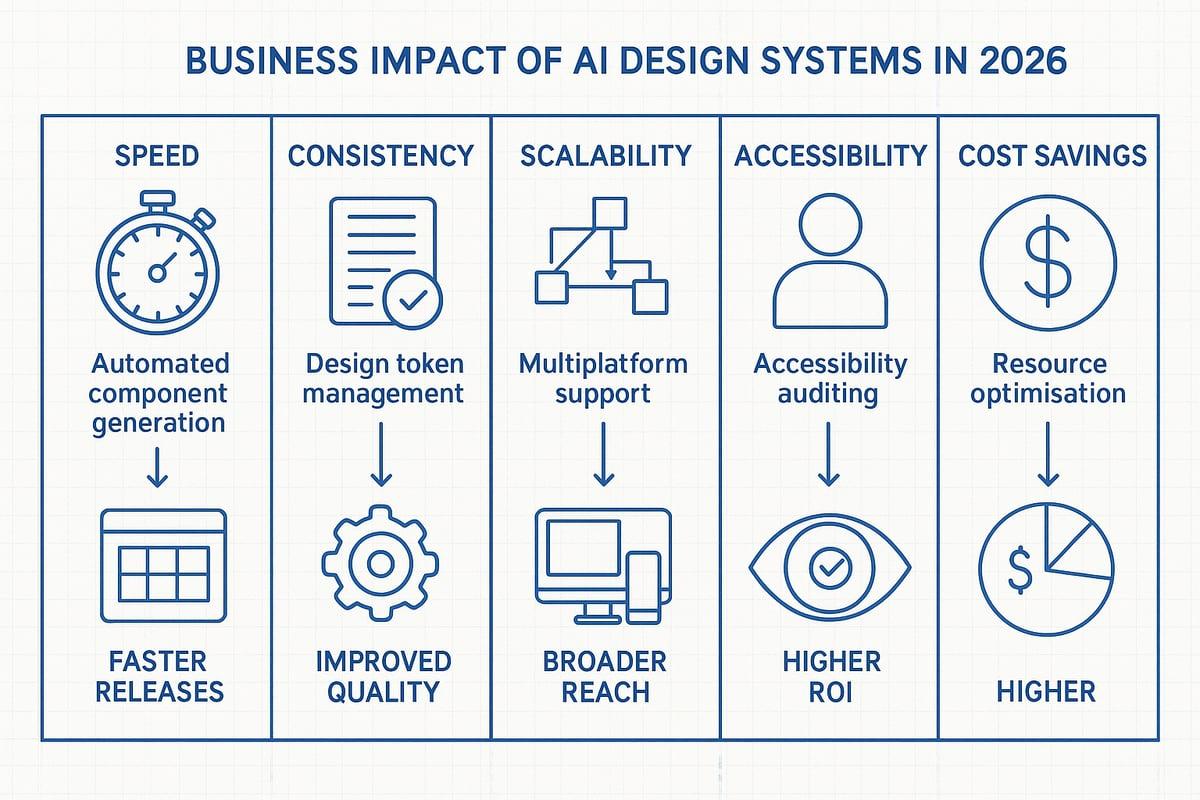
The business impact of ai design systems in 2026 is nothing short of transformative. These systems are changing how teams build, scale, and maintain digital products. If you are aiming for faster launches, better quality, and lower overheads, understanding these benefits is your first step.
Speed and Efficiency Gains
Speed is where ai design systems truly shine. By automating repetitive tasks, these systems help teams move from idea to implementation in record time. Component generation, documentation, and quality assurance are all streamlined.
Teams report component creation cycles that are 40 to 90 percent faster compared to traditional workflows. This acceleration means you can respond to market changes quickly, release updates more often, and iterate on customer feedback without waiting weeks for manual updates.
Key drivers of efficiency include:
- Automated code and component generation.
- Instant documentation updates as designs evolve.
- Faster onboarding for new team members.
The net result? Your team spends less time on grunt work and more time innovating. Ai design systems make rapid iteration the new normal, setting your business apart from slower competitors.
Improved Consistency and Quality
One of the classic challenges in digital product development is maintaining consistency. Ai design systems solve this by enforcing design standards across every touchpoint.
With ai design systems, design tokens like colours, typography, and spacing are applied automatically. This ensures every button, card, or navigation bar looks and behaves as intended, regardless of who built it.
Benefits include:
- Fewer errors and less duplication of effort.
- Robust application of brand and accessibility standards.
- Predictable, high-quality outcomes in every release.
Automated quality checks reduce human error, while instant feedback loops ensure mistakes are caught early. As a result, your products look polished, work reliably, and reinforce trust with users.
Scalability and Adaptability
Scalability is a core promise of ai design systems. As your business grows, so do your products, platforms, and user needs. Ai design systems adapt to this complexity effortlessly.
AI handles code translation between frameworks and supports multi-brand or multi-platform projects without duplicating effort. This means you can migrate from React to Web Components, or support new devices, with minimal friction.
For further insights, explore AI website optimisation strategies to see how AI-driven approaches help scale digital experiences.
Key scalability benefits:
- Effortless support for multiple brands or platforms.
- Consistent updates across large product portfolios.
- Faster adoption of new technologies and design patterns.
With ai design systems, your business remains agile, ready to seize new opportunities without being held back by legacy processes.
Enhanced Accessibility and Inclusion
Inclusive design is no longer a nice-to-have, it is essential. Ai design systems put accessibility at the heart of your workflow.
AI-powered audits spot accessibility issues early, flagging problems before they reach users. Personalised documentation supports team members of all abilities, making onboarding and collaboration smoother.
Highlights include:
- Automated accessibility checks and suggestions.
- Built-in support for diverse user needs and compliance standards.
- Customised guidance for designers, developers, and stakeholders.
By embedding accessibility and inclusion from the start, ai design systems help you reach wider audiences and meet regulatory requirements without the usual headaches.
Cost Savings and Resource Optimisation
Every business wants to do more with less. Ai design systems deliver this by cutting manual labour and freeing up your team for higher-value work.
Automation means fewer hours spent on repetitive tasks like documentation, code reviews, and manual QA. This reduction in busywork translates directly into cost savings and improved ROI.
Key areas of savings:
- Reduced need for manual updates and fixes.
- Optimised resource allocation across teams.
- More time for creative and strategic projects.
In summary, ai design systems do not just improve your workflow, they transform your bottom line. The result is a leaner, more innovative organisation poised for success in the digital age.
Challenges, Risks, and Considerations for AI Design Systems
Adopting ai design systems is not just about plugging in new tools. It brings a wave of change, with challenges that go far beyond technology. To make the most of ai design systems, organisations must carefully consider technical, organisational, and ethical factors. Let’s break down what you need to watch for—and how to stay ahead.
Organisational and Technical Challenges
Integrating ai design systems into your business is not a one-size-fits-all job. Each organisation has unique workflows, tech stacks, and processes. AI must be trained with your specific conventions or it risks producing generic, unusable results.
Customisation is key. Without ongoing tuning, ai design systems can miss the mark and create more problems than they solve. Many teams now look for platforms that allow deep integration with existing codebases and processes.
For example, companies using AI-powered marketing services often need to adapt AI tools to their brand voice and data. The same is true for ai design systems—make sure your solution fits you, not the other way around.
Security, Privacy, and Data Governance
Security and privacy are front and centre when it comes to ai design systems. Feeding sensitive code, designs, and documentation into third-party AI services can expose your intellectual property.
To protect your assets, consider on-premises AI solutions or strict data governance protocols. Make sure you understand where your data goes, who can access it, and how it’s used. Organisations must comply with regulations like GDPR, especially when dealing with user data or proprietary information.
Best practice is to create clear policies for data handling within ai design systems. This reduces risk and builds trust across your team.
Human Oversight and Quality Control
While ai design systems can automate a lot, they are not perfect. Think of AI as a junior developer: it’s fast, but it needs supervision. Human review remains essential to catch errors, ensure quality, and keep output aligned with business goals.
Set up regular checkpoints for reviewing AI-generated components, code, and documentation. Use QA processes to spot inconsistencies or accessibility issues early on.
Predictable and reliable results only come with ongoing human involvement. Don’t hand over the reins completely—keep people in the loop to get the best from your ai design systems.
Change Management and Team Adoption
Introducing ai design systems means changing how teams work. Not everyone will be eager to adopt new tools or workflows. Resistance is common, especially if the benefits aren’t clear from the start.
Smooth adoption starts with training, open communication, and involving stakeholders in the process. Pilot projects are a great way to show value quickly and build confidence.
Encourage experimentation. Create a culture where feedback is welcomed, and learning is ongoing. This helps teams feel ownership over the transition to ai design systems.
Ethical and Responsible AI Use
Ethics matter for ai design systems. AI can reinforce biases or make decisions without human nuance if not carefully managed. Transparent frameworks and regular audits are essential to keep systems fair and reliable.
Human ownership is crucial: teams should always control what data goes in and what comes out. AI should support, not replace, human creativity and judgement.
Set clear principles for responsible use. This includes respect, accountability, and ensuring ai design systems are always used to enhance—not undermine—your people and products.
Step-by-Step Roadmap to Adopting AI Design Systems in 2026
Adopting ai design systems in 2026 is more than a technical upgrade, it's a strategic shift for your entire product workflow. To make this transformation manageable, here's a practical, step-by-step roadmap you can follow, whether you're starting from scratch or evolving a mature design system.
1. Assess Current Design System Maturity
Begin by evaluating your existing design system assets, documentation, and workflows. Identify where manual processes, inconsistencies, or pain points slow your team down. This step sets a realistic baseline for integrating ai design systems and highlights gaps you need to address. Are your current libraries static or already partially automated? Pinpoint areas where automation could have the most impact.
2. Define Organisational Goals and Success Metrics
Align your adoption of ai design systems with business objectives. Do you want to speed up releases, improve quality, or boost inclusivity? Establish clear KPIs, such as time saved, error reduction, or user satisfaction. Setting measurable goals will help you track progress and demonstrate the value of ai design systems to stakeholders.
3. Select and Integrate AI-Enabled Tools
Research and choose ai design systems platforms that suit your tech stack, security requirements, and scalability needs. Options might include Figma’s MCP server or custom LLM integrations. Prioritise tools that offer robust support for component automation, documentation, and multi-framework compatibility. Integration should be seamless with your existing developer and design environments.
4. Train AI on Organisational Context
Feed your design system codebase, documentation, and conventions into the chosen AI tools. This step ensures ai design systems output matches your brand, accessibility, and technical standards. Customisation is key, so regularly update the training data as your organisation evolves. This continuous tuning helps prevent generic results that miss enterprise specifics.
5. Pilot with a Cross-Functional Team
Start small. Run a pilot project with designers, developers, and product managers. Focus on a single component library or workflow. Use this phase to gather feedback on how ai design systems handle real-world tasks. Identify strengths and weaknesses, then refine your approach before scaling.
6. Iterate, Refine, and Scale
Review all AI-generated outputs carefully. Maintain human oversight and quality assurance to catch issues early. Use feedback from the pilot to improve models and workflows. As confidence grows, expand ai design systems adoption across more teams and products, ensuring you keep refining the process.
7. Foster a Culture of Continuous Learning and Improvement
Offer ongoing training and support as teams adapt to ai design systems. Encourage experimentation, feedback, and sharing of best practices. Stay informed about new AI capabilities and regularly review your system's performance. This culture of learning ensures your investment keeps delivering returns as technology evolves.
Example Roadmap in Action
Imagine a mid-sized SaaS company with a basic design system. They start by auditing their manual workflows and set a goal to halve their component release time. After selecting an AI-enabled platform, they train it using their existing libraries and run a pilot on a new product feature. Within months, automated documentation and component generation reduce release cycles by 50%, with improved consistency. According to AI in Graphic Design Industry Statistics 2025, similar results are being seen industry-wide, with AI-driven workflows rapidly accelerating product launches. By embracing ai design systems, the team not only speeds up delivery but also boosts collaboration and innovation.
Principles and Best Practices for AI Design Systems
AI design systems are transforming how teams build digital products, but real success comes from following a set of clear, actionable principles. These best practices help you get the most out of AI while keeping control, security, and human creativity at the centre. Let’s break down what matters most.
Human-Centric and Organisation-Specific Solutions
Every organisation is unique, so your approach to ai design systems needs to reflect your culture, architecture, and business goals. AI models should be trained on your internal conventions, not just industry standards. Prioritise tools that let you customise workflows, terminology, and outputs to suit your team’s needs. On-premises solutions can help protect sensitive data and respect privacy. By focusing on your people and processes, you ensure that ai design systems work for you, not the other way around.
Respect, Security, and Ethical Use
Respect for human talent is fundamental. Ai design systems should automate repetitive tasks, freeing up time for creative problem-solving, not replacing your best people. Prioritise security by choosing platforms that support strong privacy controls and ethical AI frameworks. Consider how Generative AI for SEO highlights the importance of responsible AI use in digital workflows. Transparency, fairness, and data protection must be built in from day one, making ai design systems trustworthy and safe.
Human Ownership of Input and Output
Your team should always own the data that feeds into ai design systems, as well as the results those systems produce. Give designers and developers the power to review, edit, and refine AI-generated components, documentation, or code. Treat AI as a junior partner that needs coaching and oversight. This ensures the final output meets your exact standards and maintains your unique brand voice. Human ownership keeps ai design systems working as true collaborators.
Predictability, Reliability, and Enhancement
Choose ai design systems that deliver consistent, reliable results every time. You want tools that reduce errors, not introduce new ones. AI should enhance your workflow, not disrupt it. Build in feedback loops so teams can flag issues, suggest improvements, and keep the system evolving. This predictability builds trust and encourages wider adoption across your organisation. When ai design systems act as reliable partners, teams can focus on innovation.
Future-Proofing and Adaptability
The world of ai design systems moves quickly, so your approach needs to be flexible. Regularly review and update your tools, processes, and training. Stay informed about new AI capabilities, industry standards, and compliance requirements. Encourage a culture of experimentation and continuous learning. This adaptability ensures your ai design systems stay effective as your business grows and technology evolves, helping you stay ahead of the curve.
Real-World Examples and Lessons Learned
Organisations like Figma and Big Medium have shown that successful ai design systems are built on customisation, human oversight, and gradual scaling. Lessons learned include the importance of training AI on real company data, involving humans at every step, and evolving the system based on feedback. By following these principles, teams can unlock efficiency, creativity, and reliability, setting themselves up for long-term success with ai design systems.
If you’re keen to put what you’ve just read into action and actually see how AI design systems could work for your business, let’s chat. I know the journey from theory to results can feel daunting, especially with all the changes coming in 2026, but you don’t have to figure it out alone. I’ll help you pinpoint the quick wins—whether it’s automating the dull stuff, boosting your conversions, or simply making your design and dev teams happier. Fancy a proper, no-nonsense chat about what’s possible? Get free 45 min consultation
Keep reading
More on ai

AI Prototyping
Imagine turning your spark of an idea into a working product, powered by AI, in just minutes—without writing a single line of code. That’s the promise of ai prototyping in 2026.

AI Website Redesign
Website design is changing at breakneck speed, thanks to AI advancements that are rewriting the rules for digital success. If you want your business to stay ahead in 2026, your website needs more than just a fresh look. It demands smart, data-driven innovation.

AI UI Kits
AI-driven design tools are evolving at breakneck speed, and the demand for rapid, future-ready UI development has never been higher. As digital products race to innovate, ai ui kits are stepping in to revolutionise how designers and developers work.
Want this done rather than read?
Tell me what you sell and what isn't working. The audit that starts every engagement is free, and you keep the roadmap either way.